Can a Chromebook save Pinterest videos without extensions?
Yes. Everything happens in a normal Chrome tab, which is convenient on a school or work Chromebook where extensions and Android apps are often locked by an administrator. You paste the pin link, the tool checks the files Pinterest keeps for that pin, and Chrome downloads the one you click.
No Pinterest account or login is needed, and nothing is installed. Google notes that on managed Chromebooks some devices or files might not work, so if a download is blocked on a school device, that is a policy set by your administrator, not a fault in the file.
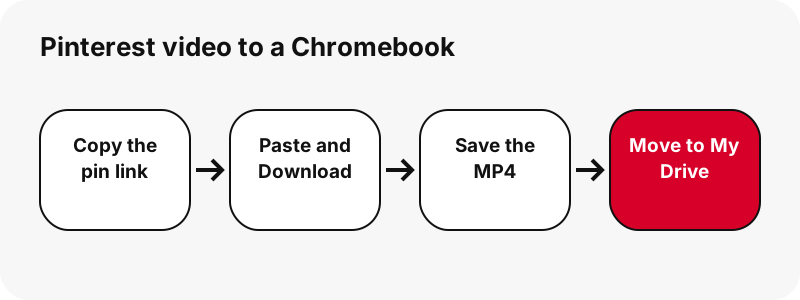
Where do downloaded Pinterest videos go on a Chromebook?
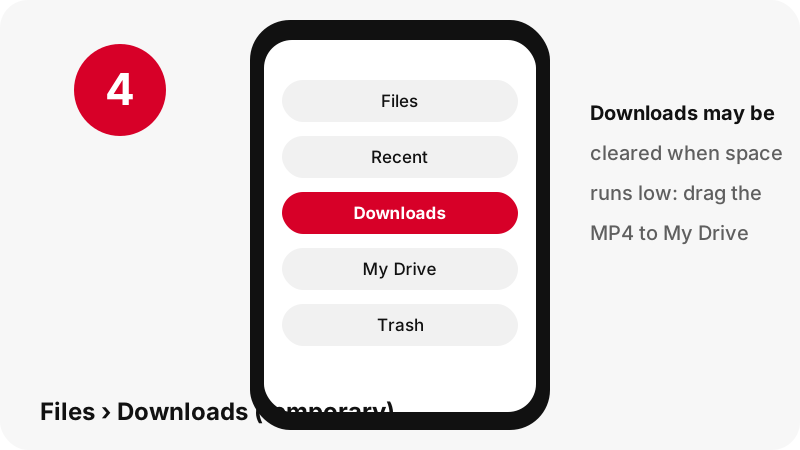
They go to the Downloads folder in the Files app. Google describes that folder in plain terms, and the second half of the sentence is the part that matters for anything you want to keep.
“By default, your files are saved to your Downloads folder, a temporary folder on your Chromebook's hard drive.”
Open Files › Downloads
Select the Launcher, open Files and choose Downloads on the left. For something you just saved, Google suggests the Recent view, which can be sorted by name, size, type or date. The search icon at the top right finds the file by name.
Or straight from Chrome
The download icon next to the address bar shows the finished file, and More › Downloads lists every download, as on any desktop Chrome.
Why should you move the video out of Downloads?
Because ChromeOS can delete it. Google's help says any file in the Downloads folder could get deleted if your Chromebook runs out of space. Google also notes the drive has limited space, and a few long clips fill them faster than you expect: in our tests a 90-second idea pin was 20.9 MB at 720×1280.
- Open Files and select Downloads on the left.
- Drag the MP4 onto My Drive (Google Drive) or another permanent folder.
- Rename it while you are there, for example
pottery-tutorial.mp4, so it is easy to find later.
Google Drive also lets you mark a file or folder Available offline from the Files app, so a clip you moved to My Drive still plays on a train without Wi-Fi. Turn on the Offline setting in Drive first; Google says it can take a few minutes.
How do you save straight to Google Drive instead?
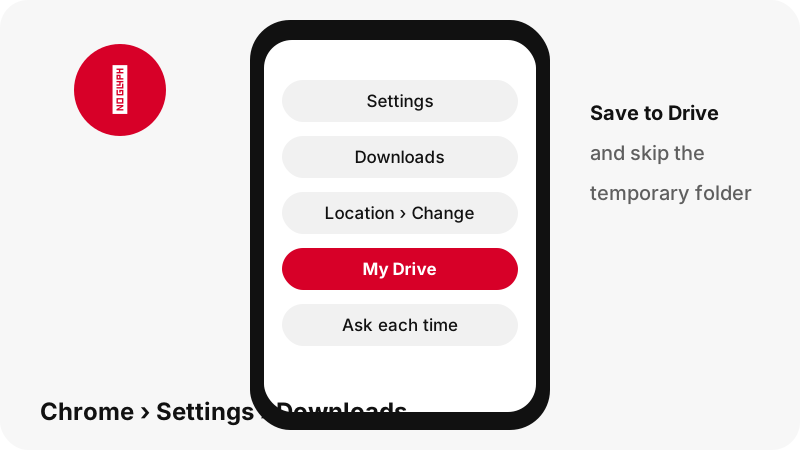
Change Chrome's download folder, or make Chrome ask each time. Both settings live in the same place, and once set, Pinterest videos skip the temporary folder entirely.
| What you want | Where to set it | Effect |
|---|---|---|
| Always save to one folder | Chrome › More › Settings › Downloads › Change | Every download goes to the folder you pick, such as a folder in My Drive |
| Pick a folder each time | Same page: Ask where to save each file before downloading | Chrome shows a save dialog for every MP4 |
| Keep the default | No change | Files land in Downloads, a temporary folder |
If you save to Drive, the file needs an internet connection to sync. For a quick one-off, the ask-every-time option is the least effort: you still click one button, and you choose My Drive in the dialog.
Will the MP4 play on a Chromebook?
It should, but we want to be precise about what Google's page says. Its list of media extensions names .mov, .m4v and .m4a but not .mp4. Its codec table, on the same page, does list the mp4 container with H264 video, which is what our MP4 contains.
Google also writes that Chromebooks no longer support "MPEG4" as a codec. The page does not say which codec that word covers; for the record, the files the tool gives you are H.264 video with AAC sound. We have not tested playback on a Chromebook ourselves, so treat this as documented, not measured.
To open the clip, find it in Files and double-click it: Google's Gallery help says photos and videos open with the Gallery app from Camera, Downloads or My Drive. If Gallery refuses it, play it in Chrome; MDN lists the MP4 container as supported by all browsers.
What else can you save from a pin on ChromeOS?
The same result card offers pictures and sound, and Google's file-type list covers each of them. This table puts the two side by side.
| Button on the result card | Extension | On Google's Chromebook list? |
|---|---|---|
| Video | .mp4 (H.264 + AAC) | Codec table: mp4 / H264 (not in the media extension list) |
| Smaller video (idea pins) | .mp4 | Same as above |
| First frame and cover | .jpg | Yes, images: .jpg, .jpeg |
| Image pin original | .jpg, .png or .webp | Yes, all three |
| GIF pin | .gif | Yes, images: .gif |
| Sound | .m4a (AAC) | Yes, media: .m4a |
The .m4a sound file is not an MP3; it is the AAC track copied out of the MP4 without re-encoding. See Pinterest audio for details, and Pinterest images on Chromebook for pictures.
What if you browse Pinterest in its Android app on the Chromebook?
Copy the link in the app and paste it in Chrome; the result is the same MP4. In the app, tap Share › Copy link, switch to Chrome and paste into the box above with Ctrl+V. If the paste comes up empty, open the pin in Chrome instead and copy its address.
Chrome saves to Downloads; Android apps save elsewhere: Google's help says to open Files and, under My files, select Play files to see them. If you ever save a picture with the app's own Download image option and cannot find it in Downloads, look there.
Our MP4, M4A and JPG buttons always download through Chrome, so for this tool you only need to check one folder.
Why is the video 720p and not sharper?
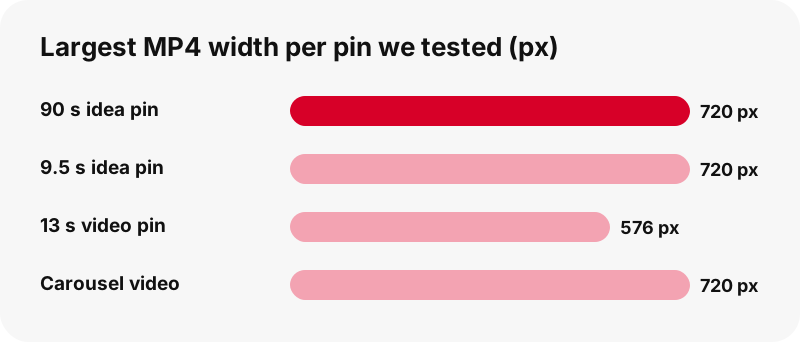
Because 720p is the largest MP4 Pinterest stores for a video pin, on every device. A Chromebook screen does not change that, and no tool can download a 1080p file that Pinterest does not have.
We checked this on an idea pin whose source was listed as 1080×1920: its largest streaming entry and its largest MP4 were both 720×1280. Classic video pins we tested came out at 720×1280 or 576×1024. Each button shows these numbers before you click, so you are never guessing.
The thumbnail is a different story: the first-frame image is often full size, such as 1080×1920. Details in Pinterest video quality explained.
Deleted a Pinterest video by mistake? Can you get it back?
Maybe. Google's two Chromebook pages do not say the same thing. One says that deleting a file in Downloads is permanent and can't be undone. The general files page says most deleted files go to Trash, where they stay for 30 days before permanent deletion.
So look in Files › Trash first and use Restore from trash if the clip is there. If it is not, the quickest fix is to paste the pin link again here and download a fresh copy, as long as the pin is still public. Old download buttons will not work, because every link expires after one hour.
Can you pin SaverPin to the Chromebook shelf?
Yes, as a web app installed from Chrome; there is no Play Store app and no extension from us. Google's web-app help covers Chromebooks: install with More › Cast, save, and share › Install page as app…, and uninstall from the launcher by right-clicking the icon.
The installed window is the same page, with the same limits. Read the downloader app page before trusting any "Pinterest downloader" app that asks for your Pinterest password.
What does not work, on a Chromebook or anywhere?
- Private pins and secret boards: they need a login, and the tool never asks for one. Why private pins are out of reach.
- 1080p or 4K files: Pinterest stores 720p at most.
- A ZIP of a whole board: board mode lists up to 50 pins, saved one by one.
- GIF-to-MP4: Pinterest has no MP4 copy of GIF pins.
- Captions and subtitles: not downloadable.
Something else broken? The troubleshooting page explains each message the tool can show. And before reposting a clip, read whether downloading Pinterest videos is legal.
Guides for your other devices
- How to download Pinterest videos on PC
- How to download Pinterest videos on Android
- How to download Pinterest videos on Mac
- Pinterest GIFs on Chromebook
- Where Pinterest downloads go, device by device
Frequently asked questions
Where do Pinterest downloads go on a Chromebook?
To the Downloads folder in the Files app, which Google calls a temporary folder on the Chromebook's drive.
Can ChromeOS delete my downloaded Pinterest videos?
Yes. Google says files in Downloads could be deleted if the Chromebook runs out of space. Move clips you want to keep to My Drive or another folder.
How do I save Pinterest videos directly to Google Drive?
In Chrome, go to More › Settings › Downloads and change the folder to one in My Drive, or turn on the option to ask where to save each file.
Which app opens the MP4 on a Chromebook?
Double-click it in Files; Google says photos and videos open with the Gallery app. If it does not, play it in a Chrome tab.
Does it work on a school Chromebook?
Usually, because it needs no extension or app. Your administrator can still block downloads or file types; that is a device policy.
Can I watch the video offline?
Yes. A file in Downloads plays offline. A file in My Drive needs Available offline turned on in the Files app.
What quality do I get?
Up to 720p, the largest MP4 Pinterest stores. The buttons show the real size, such as 720×1280, before you click.
Can I save only the audio on a Chromebook?
Yes, as an .m4a file, which is on Google's list of Chromebook media types. It is the original AAC sound, not an MP3.
Is there a Chromebook app or extension?
No. You can install the page as a web app from Chrome's menu, which opens the same tool in its own window.
I deleted a video by mistake. Can I get it back?
Check Files › Trash first. If it is not there, paste the pin link again and download a new copy while the pin is public.
Is SaverPin part of Pinterest?
No. SaverPin is an independent tool and is not affiliated with Pinterest. It only reads public pins.
Can I use a downloaded Pinterest video in a school project?
That depends on copyright rules where you live and on how you use it. Credit the creator and read our page on whether downloading Pinterest videos is legal.
Guides
Video — Paste a pin link and save the video as MP4, up to 720p.
Sources
- Open, save, or delete files on your Chromebook — Google
- Keep your downloaded files from being deleted — Google
- File types & external devices that work on Chromebooks — Google
- Open & edit photos (Gallery app) — Google
- Use Google Drive files offline on your Chromebook — Google
- Download a file (Chrome on a computer) — Google
- Use web apps — Google
- Media container formats — MDN Web Docs