What does the Pinterest board downloader do?
It turns a public board into a list of up to 50 pins you can save from, without opening each pin. You paste the board link once, press List pins, and get a grid of thumbnails, each with its own Get button.
When you press Get, that pin is resolved exactly like a single pin: the server finds its files, reads their first bytes, and shows buttons for the MP4, the original image, the GIF or the stills, with real sizes. The card above the grid states how many pins it is showing out of the board's total.
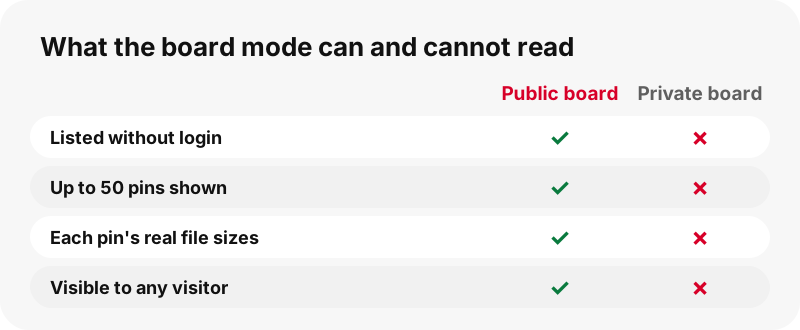
There is no login and no extension. The Pinterest board downloader reads only what any visitor could see on the public board.
Why does the Pinterest board downloader stop at 50 pins?
Because 50 is how many pins the tool lists from a board's public feed, and we prefer to say so up front. Large boards can hold hundreds of pins; the card reads "Showing 50 of" followed by the board's total, so you always know whether you are looking at the whole board or part of it.
Keeping the list at 50 keeps listing quick and the page light on a phone, and it means the count you see is always the count you get.
If a board is bigger, save the pins you need from the first 50 and use the link downloader for any specific pin further down, by pasting its own link.
What counts as a Pinterest board?
A board is a named collection of pins on someone's profile. Pinterest's help center sums it up in one sentence:
“Boards are collections for your Pins.”
Pinterest's help shows that boards can be kept secret and can have collaborators. The Pinterest board downloader works on the public board as a whole. It does not open board sections or a profile's tabs, and it never sees boards that are kept private.
A board can mix videos, idea pins, GIFs and photos. Each one keeps its own kind when you press Get.
Which board links can I paste?
A board address or a pin.it short link that leads to a board. Everything else gets a clear message instead of a guess.
| Link | Works? | What happens |
|---|---|---|
| pinterest.com/name/board-name/ | Yes | Up to 50 pins listed |
| Same board on another country domain | Yes | Treated the same way |
| pin.it short link to a board | Yes | Board mode opens automatically |
| A board section (…/board-name/section/) | No | Not supported |
| A profile page or its tabs | No | Not supported |
| A private (secret) board | No | Not visible to the public |
| A single pin link | Yes | Resolved as one pin |
Pasting a single pin here is fine: you simply get that pin's buttons, as on the video downloader.
Can I download a private or secret board?
No, and no outside tool can do it honestly. A private board is not published at all. Pinterest's help page on private boards is explicit:
“Only you (and anyone you invite) can see your private boards.”
If the board is yours, the simplest route is to make it public for a moment in the board settings, list the pins, then switch it back. Pinterest documents the toggle (Make this board private) on the same page. If it belongs to someone else, ask them to share the files with you.
The private pins guide explains why sites claiming otherwise should not be trusted.
How does "Get all, one by one" work?
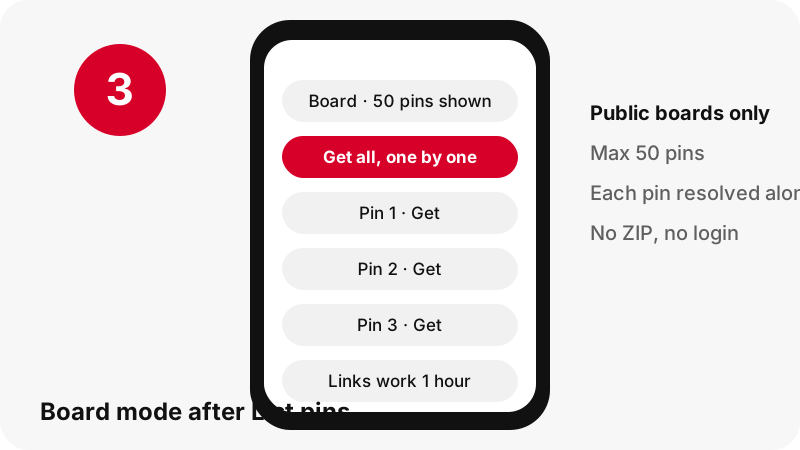
It walks down the list and prepares each pin in turn, so every pin card fills with its buttons without you pressing Get fifty times. Pins are handled in sequence, not all at once, which keeps the load on your connection and on Pinterest modest.
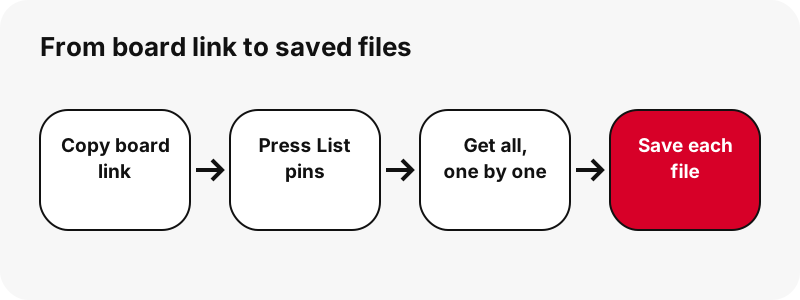
- Press List pins and wait for the grid.
- Press Get all, one by one.
- Watch each card switch from thumbnail to buttons.
- Tap the buttons for the files you want to keep.
Nothing is zipped. Each file stays a separate download, because files are streamed from Pinterest to you and never stored on our side, so there is no server copy to pack into an archive.
Why does my browser ask about multiple downloads?
Browsers guard against sites that start many downloads at once, so saving lots of files from a board can trigger a permission prompt. Google's Chrome help explains the setting:
“You can choose to allow sites you visit to download related files together.”
In Chrome on a computer the default lives under Settings › Privacy and security › Site Settings › Additional permissions › Automatic downloads. Google's site settings page describes it as letting sites download related files together.
Allow it only for sites you trust, and only while you need it.
How do I keep a board's files organised?
Give each board its own folder before you start. Downloads from a busy board can quickly bury the rest of your Downloads folder.
- Chrome: turn on Ask where to save each file before downloading, which Google documents in its download help, and pick the board's folder.
- Safari on Mac: Apple shows how to choose the File download location under Safari › Settings › General.
- Edge on Windows: the folder is changed under Settings › Downloads.
- Afterwards: rename files by theme, such as kitchen-01.jpg, while you still remember what each one was.
Pinterest file names are long strings of letters, so a folder per board is the easiest way to find things later.
What files does each pin on a board give you?
The same files it would give as a single pin. The board view is only a list; once you press Get, every pin is resolved on its own with its real sizes.
| Pin type on the board | Buttons you get | Example from our tests |
|---|---|---|
| Classic video pin | MP4, thumbnail, cover, audio (M4A) | MP4 576×1024, 3.3 MB |
| Idea pin (video) | MP4 at 720p, 486×864 and 360×640, plus stills and audio | MP4 720×1280, 2.2 MB |
| Picture pin | Original image in its own format | 1080×1521, 160 KB |
| GIF pin | Animated .gif and still JPG | 396×223 GIF, 494 KB |
| Carousel | One item per slide, up to 20 | 13 slides listed in ~1.8 s |
For the details of each type, see the image downloader, the GIF downloader and the thumbnail downloader.
How much data does saving a whole board use?
It depends almost entirely on how many videos the board holds. Pictures are light; clips are not. The single-pin tests we ran on 2026-10-24 give a sense of the spread:
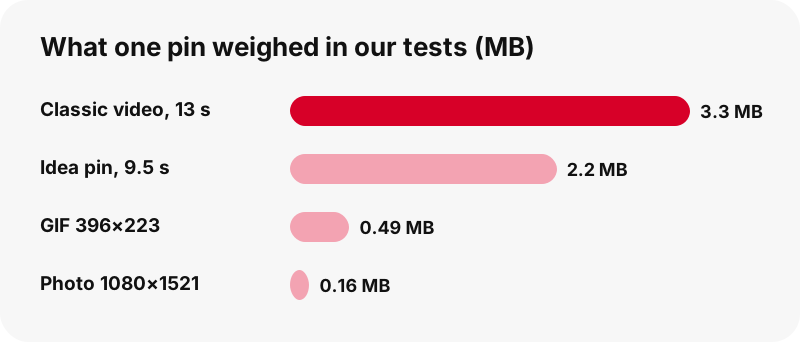
A board of 50 recipe photos at around 160 KB each would come to roughly 8 MB. A board of 50 short idea pins at 2.2 MB each would be nearer 110 MB. Those are illustrations built from our measured files, not promises about any other board.
Because every button shows the real size, you can skip the heavy items on mobile data and fetch them later on Wi-Fi.
How long does listing a board take?
Listing is one request for the board feed, then each pin you open is resolved separately. In our local tests a single pin resolved in about 1.1 to 1.5 seconds.
If every pin took that long, preparing all 50 one after another would take roughly one to one and a quarter minutes. That is an estimate from our measurements, and real times depend on your connection and on the mix of pins. Carousels hold several items and take a little longer.
You do not have to wait for the whole run. Buttons appear on each card as soon as that pin is ready, so you can start saving from the top while the rest load.
Saving board pins on iPhone and iPad
Safari saves each file to the Files app. Apple says internet downloads appear in the Downloads folder in Files, and the Downloads button beside Safari's search field shows the latest ones.
With a board, that folder fills fast. Apple's Safari settings guide shows how to send downloads to iCloud Drive, to the device, or to another folder, so you can keep a board's files in one place.
A phone is fine for picking ten favourites from a board. For all 50, a computer is more comfortable: bigger screen, easier folders, and no storage worries. Our iPhone guide covers the video side.
Saving board pins on Android
Chrome stores each file in the default download location, and Google notes that all downloaded files can be found in the Files app. Open Chrome's menu › Downloads to see what you have saved from the board so far.
To see pictures from the board in your gallery, Google Photos shows folders from other apps under Collections › On this device.
Keep an eye on free storage if the board is full of videos. The Android guide explains where each file type ends up.
Is a computer better for whole boards?
Usually, yes. A Pinterest board downloader produces many separate files, and a desktop browser makes it easier to choose folders, allow related downloads and sort the results.
- Windows and Mac: Chrome saves to the Downloads folder by default, with the paths listed in Google's download help.
- Chromebook: Google warns that the Downloads folder is temporary and may be cleared to free space, so move board files to Google Drive.
- Any computer: one folder per board, created before you press Get all.
Step-by-step desktop help is in the PC guide and the Mac guide.
Good reasons to save a board
Most people save boards to keep their own ideas within reach. A few typical cases:
- Keeping a copy of your own boards offline: a wedding plan, a renovation, a recipe collection.
- Taking reference pictures to a shop or builder when there may be no signal.
- Preparing a class or workshop with examples you will show and credit.
- Collecting your own published pins as a portfolio backup.
In each case the tool saves files only; titles, descriptions and links of the pins are not exported. Note them down if you need the sources later, especially if you plan to credit creators.
Can I reuse what I download from someone's board?
Saving for yourself and republishing are different things. A board is usually a collection of other people's photos, videos and designs, and whoever pinned them rarely owns them.
The U.S. Copyright Office explains the exception that applies to many everyday uses:
“Fair use is a legal doctrine that promotes freedom of expression by permitting the unlicensed use of copyright-protected works in certain circumstances.”
Fair use is decided case by case. Pinterest's copyright policy explains how owners report reposts. Ask creators before publishing their work, and read our legal guide for common situations.
Does SaverPin keep the boards I list?
No. The board feed is read when you press List pins, the files are streamed from Pinterest through signed links, and nothing is stored on our servers. Each download link expires after one hour.
There is no account, so there is no history tied to you, and the tool never asks for your Pinterest password. SaverPin is independent and has no connection to Pinterest; it simply reads what the public board shows.
If you come back to a board after more than an hour, press List pins again to get fresh links.
Why won't the Pinterest board downloader list my board?
Almost always because of the link or the board's privacy. Check these points:
- Open the board in a private browser window. If it asks you to log in, it is private.
- Use the board's main address, not a section or a profile tab.
- If you pasted a pin.it link, make sure it opens a board and not a deleted pin.
- If the grid appeared but buttons fail, the links may have expired: list the pins again.
- If only some files download, allow related downloads for the site in your browser.
More causes and fixes are in the troubleshooting guide.
Other ways to save from Pinterest
Need one exact file rather than a list? These tools focus on a single type.
Frequently asked questions
Is SaverPin part of Pinterest?
No. SaverPin is an independent tool, unaffiliated with Pinterest, that reads only public boards and pins.
Is the Pinterest board downloader free?
Yes. No payment, no account and nothing to install.
How many pins can I download from a board?
Up to 50 pins are listed from a public board. The card shows how many it lists out of the board's total.
Can I download a whole board as a ZIP?
No. Each pin's files are separate downloads. Files are streamed and never stored on our side, so there is no archive to build.
Can I download a secret or private board?
No. Only the owner and invited people can see a private board, so no outside tool can read it.
Does it work on board sections?
No. Board sections and profile tabs are not supported; paste the main board link instead.
Can I paste a pin.it link to a board?
Yes. When a short link leads to a board, board mode opens automatically.
Does the board downloader save videos too?
Yes. Video pins on the board get MP4 buttons up to 720p, plus thumbnail, cover and audio.
Why do I only see 50 pins of a bigger board?
That is the tool's limit for one board. Paste the link of any other pin from the board to save it individually.
Why did Chrome block some downloads?
Chrome can ask before a site downloads several related files. You can allow it under Site Settings › Automatic downloads.
Are pin titles and descriptions saved?
No. Only the files are saved. Note the pin links if you want to credit or revisit them.
Do I need a Pinterest account?
No. Public boards can be read without logging in.
Guides
Video — Paste a pin link and save the video as MP4, up to 720p.
Sources
- Create a board — Pinterest Help Center
- Private boards — Pinterest Help Center
- Copyright — Pinterest Policy
- Download a file (Chrome on a computer) — Google Chrome Help
- Change site settings permissions — Google Chrome Help
- Download a file (Chrome on Android) — Google Chrome Help
- Where to find downloads on your iPhone or iPad — Apple Support
- Download items from the web using Safari on Mac — Apple Support
- Open, save, or delete files on your Chromebook — Google Chromebook Help
- U.S. Copyright Office Fair Use Index — U.S. Copyright Office