What is the quickest way to save Pinterest video as MP4?
The quickest way to save Pinterest video as MP4 is to hand the pin link to a saver that collects the file Pinterest itself stores. The Pinterest app lets you save a pin to a board, but a board is not a folder on your phone. To watch the clip on a plane, drop it into an editor or keep it after the pin vanishes, you need an actual .mp4 file.
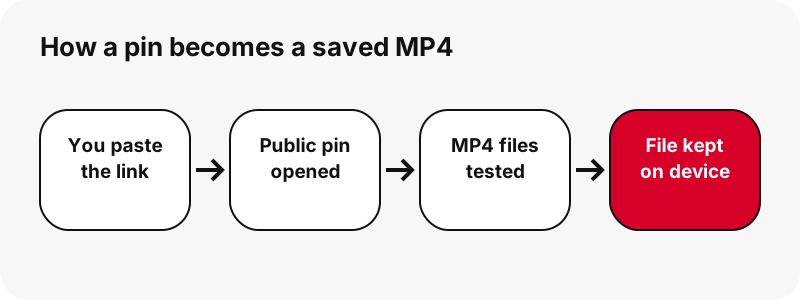
SaverPin does that without asking you to sign in. You paste the link, it opens the pin the way a logged-out visitor would, and it shows every MP4 attached to it. Nothing is rebuilt on our side: the file you keep is the one Pinterest plays in its own player.
Looking for the soundtrack only? The audio saver pulls the sound out of a pin and stores it as M4A, right on your device.
Why keep Pinterest's own file instead of converting it?
Keeping the stored file protects the picture. Many sites advertise a Pinterest to MP4 converter, yet a real conversion means decoding every frame and compressing it again. Each round of lossy compression drops a bit more detail, which Wikipedia covers under generation loss.
The transcoding article makes the same point: going from one lossy format to another usually costs quality. Since Pinterest already holds a playable MP4, there is no reason to touch it. SaverPin passes along the H.264 video and AAC audio exactly as Pinterest encoded them.
A tool that promises a sharper result after converting a pin is describing something no encoder can do. Compression can preserve detail or remove it, but it cannot invent detail that was never captured.
Which kinds of pins give you an MP4?
Only pins that carry moving video give you an MP4. That covers standard video pins, idea pins and the video pages inside a multi-page pin. Photo pins and animated GIF pins hold no video track, so the saver offers their real format instead of faking an MP4.
| Kind of pin | How Pinterest keeps it | What the saver hands you |
|---|---|---|
| Standard video pin | A single MP4 tagged 720p (H.264 video, AAC audio) | That MP4, with the cover and thumbnail as JPG |
| Idea pin (vertical short) | An HLS stream offered in several sizes | A 720p MP4 and two lighter MP4 copies |
| Multi-page pin with video pages | A separate file for each page | One MP4 per video page, at most 20 pages |
| Photo pin | The image as uploaded | The original image file, no MP4 |
| Animated GIF pin | A .gif plus a still frame | The .gif itself, since no MP4 copy exists |
For moving pins that are really GIFs, the GIF saver keeps them as .gif. For still pictures, use the image saver, which returns the original upload.
How does an idea pin turn into a single MP4 file?
An idea pin arrives as a stream, not a file. The pin's public data points to an HLS playlist, a list of tiny video segments that a player loads one after another. That works for watching, but you cannot drag a playlist into your gallery.
The saver reads that playlist, notes its biggest size, and looks for the MP4 Pinterest keeps at that same size. It then asks the server for the file and only shows a button when the file really answers. When no matching MP4 can be reached, you get a short explanation instead of a dead link.
Many people know idea pins as Pinterest Reels. The Reels saver page goes deeper into idea pins with several pages.
What is stored inside the MP4 you save?
Inside the file you save are two streams: picture compressed with H.264 and sound compressed with AAC. The .mp4 name describes only the wrapper that holds them together. Wikipedia defines that wrapper like this:
“MP4, officially MPEG-4 Part 14, is a digital multimedia container format most commonly used to store video and audio, but it can also be used to store other data such as subtitles and still images.”
What decides compatibility is the codec inside the wrapper. According to Wikipedia's page on Advanced Video Coding, H.264 is by far the most used format for recording, compressing and sharing video. That popularity is the reason a saved pin opens on old laptops, cheap phones and smart TVs alike.
Why does the saver ignore HEVC versions?
HEVC versions are left out because a file that will not open is worth nothing to you. Pinterest does keep H.265 (HEVC) encodes of some idea pins, and its product specs accept both H.264 and H.265 uploads. HEVC files are smaller, but support is uneven.
Apple's help article on media that will not play points at HEIF and HEVC as trouble spots for older hardware. To keep things predictable, SaverPin offers H.264 MP4s only, the kind that every browser, gallery app and editor accepts.
How much storage will a saved Pinterest MP4 take?
Expect a short pin to take a couple of megabytes and a long one around twenty. The exact number depends on running time and on how busy the picture is: a static talking head compresses far better than a fast cooking montage at the same resolution.
| Pin we saved (2026-10-24) | Biggest MP4 offered | Size on disk |
|---|---|---|
| Idea pin, 9.5 seconds | 720×1280 | 2.2 MB (2,244,061 bytes) |
| Idea pin, 90 seconds | 720×1280 | 20.9 MB |
| Standard video pin, 13 seconds | 576×1024 | 3.3 MB |
| Standard video pin, 7 seconds | 720×1280 | 0.4 MB |
| Video page of a multi-page pin | 720×900 | 370–823 KB |
Because the result card prints the size up front, you can decide before spending mobile data or filling a nearly full phone.
Which of the MP4 buttons is worth saving?
Save the top button when you have the space; it is the sharpest file. Idea pins come with three H.264 options cut from the same stream. Our 9.5-second sample weighed 2.2 MB, 1.3 MB and 0.9 MB.
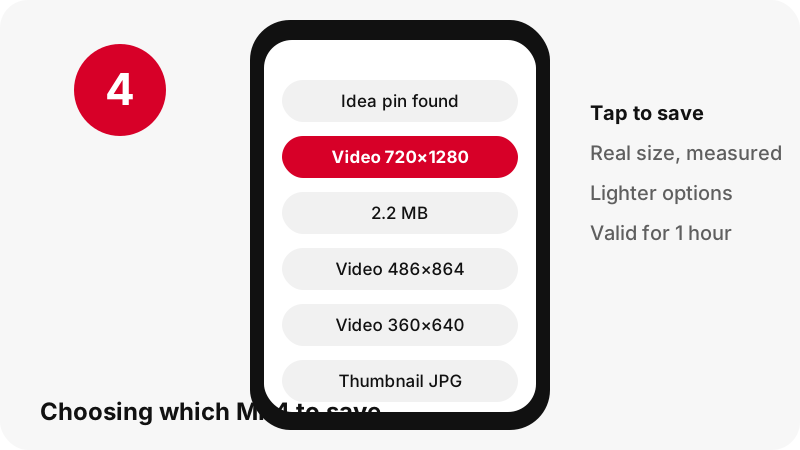
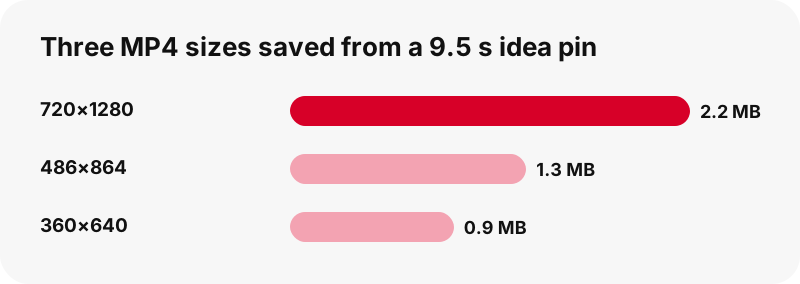
- 720×1280: the one to keep for editing, tablets, laptops or casting to a TV.
- Around 486×864: a sensible pick on a metered plan; still crisp on a phone.
- Around 360×640: handy for weak signal, a quick look, or forwarding in a messenger.
Standard video pins normally show a single MP4, because Pinterest lists just one for them. How the saver picks the largest file is explained on the HD saver page.
Is 720p the best Pinterest to MP4 quality you can get?
Yes, 720p is the ceiling in every pin we tested. One idea pin had a 1080×1920 source listed in its data, yet its largest stream entry and its largest MP4 were both 720×1280. A 1080p file simply was not there to save.
If another service labels a Pinterest download as 1080p or 4K, it has enlarged a 720p video. The frame gets bigger; the detail does not. The guide to Pinterest video quality shows how to check what resolution a file really has.
Is the soundtrack saved together with the video?
Yes, the soundtrack travels inside the MP4. Music, narration and background noise all stay in the AAC track exactly as the pin plays them. The only exception is a pin that was uploaded without audio; its MP4 is silent because there is no track to keep.
SaverPin checks for a sound track and tells you when one is missing. If your saved clip plays without sound, the no-sound troubleshooting page lists the usual causes, from a silent upload to a muted phone.
Where do you find the MP4 once it is saved?
Your browser decides where saved files go. No app gets installed and SaverPin keeps no copy. On the most common devices, look here:
| Device | Folder to open | Help page |
|---|---|---|
| iPhone and iPad | Files app, then Downloads | Apple Support |
| Android with Chrome | Chrome's download location, visible in the Files app | Google Chrome Help |
| Windows PC | Downloads in File Explorer | Your browser's download settings |
| Chromebook | Downloads inside the Files app | Chromebook Help |
Device walkthroughs are ready for iPhone, iPad, Android, Mac and Windows PCs. If a file seems lost, this folder guide tracks it down.
Will the saved MP4 open in my video player?
It should, since H.264 video with AAC sound is the pairing nearly every player understands. Microsoft's page for Windows Media Player errors names MPEG-4 (H.264) video and AAC audio among the formats supported without add-ons.
Google's Chromebook file types list includes mp4 with H264, and Apple's own apps handle the format too. When a file will not open, the cause is usually a download that stopped halfway. Paste the link again and save a fresh copy while the one-hour window is open.
Why is saving the MP4 better than recording your screen?
Saving the MP4 wins because a screen capture is a copy of a copy. The recorder compresses whatever the display shows, so it can pick up the clock, a battery icon, a message banner or your finger, and its quality depends on your phone's settings. The saved file is the clip and nothing else.
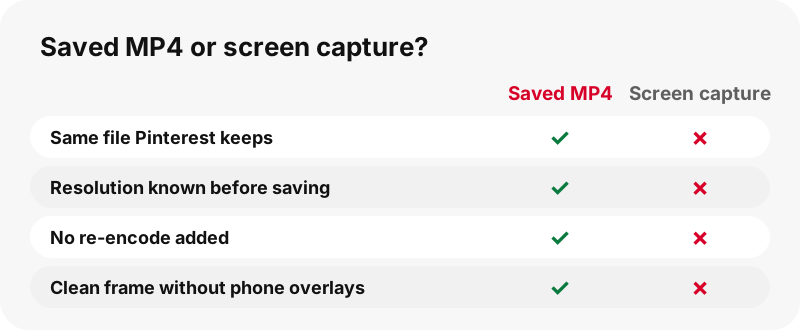
A screen capture only makes sense for a video you are allowed to keep but that no saver can reach, such as a pin you can see while logged in but that is not public.
Can you trim, caption or crop the MP4 later?
Yes. The file is ordinary H.264, so phone apps, desktop editors and browser editors open it without complaint. Begin with the 720p version: exporting an edit compresses the video once more, and a sharper starting point holds up better.
Vertical pins are mostly 720 pixels across and 1280 tall, a 9:16 frame. Keep it for vertical feeds or crop deliberately for a square or wide layout. Trimming someone's clip does not transfer the rights, so read the guide on legal use before posting it anywhere.
What are the limits of the MP4 saver?
Knowing the limits up front avoids wasted attempts. The saver will not:
- Open private pins or secret boards; the private pins page explains why.
- Produce a 1080p or 4K file, because Pinterest tops out at 720p.
- Change a GIF pin into an MP4, since only the .gif exists.
- Bundle a board into one archive; the board saver lists up to 50 public pins that you save one at a time.
- Export subtitles or captions as their own file.
When a request falls outside these limits, you see a clear message. If a public pin fails for no visible reason, the not-working checklist covers the common fixes.
Is it safe and allowed to save Pinterest video as MP4?
Saving for your own offline viewing is the safe, low-risk use. SaverPin asks for no account and no Pinterest password and installs nothing. Each save link expires after one hour, and the file streams from Pinterest's servers through that link instead of sitting on ours.
Copyright is where care is needed. Pinterest's copyright policy explains that it acts on infringement notices and may take content down. Keeping a recipe clip to follow in the kitchen is not the same as reposting it under your name. If you plan to share it, ask the person who made it.
SaverPin is an independent service and is not affiliated with Pinterest.
Frequently asked questions
Does it cost anything to save a Pinterest video as MP4 here?
No. Saving is free, there is no sign-up, and no paid plan unlocks a better file. Everyone gets the same MP4 Pinterest stores.
Which link should I copy from the Pinterest app?
Use Share, then Copy link on the pin itself. Both full pinterest.com links and pin.it short links work; a short link that leads to a board opens the board list instead.
Can I save MP4s on an iPhone without an app?
Yes. Safari saves the MP4 to the Downloads folder in the Files app, and from there you can move it to Photos. The iPhone guide shows each tap.
What resolution will my saved MP4 have?
Up to 720p, which is the largest MP4 Pinterest serves in our tests. Vertical clips are usually 720×1280. The exact numbers are printed on each button before you save.
Why do I see three video buttons for one pin?
Idea pins are kept in several sizes for streaming, so the saver offers the 720p MP4 plus lighter copies of roughly 486×864 and 360×640 for slow or metered connections.
Can an animated GIF pin be saved as MP4?
No. Pinterest stores GIF pins only as .gif files, so there is no MP4 to save. The GIF saver hands you the original .gif.
Will SaverPin add a logo to my video?
No. Nothing is added or burned in. Any text or logo you see was placed in the video by its creator and is part of the picture.
Is there a limit on idea pins with many pages?
Yes. The saver reads up to 20 pages of a multi-page pin and offers one file per page: an MP4 for video pages and the original image for picture pages.
Can I save every video from a board at once?
Partly. The board saver lists up to 50 public pins and prepares them one after another, but it does not pack them into a single ZIP file.
My save link gives an error. What now?
Save links expire one hour after they are created. Paste the pin link again for a new one, and check the not-working page if the error stays.
Can I save a video from a secret board?
No. Secret boards and private pins are visible only to their owner and invited members, so no public tool can read them.
Is the MP4 audio the same as on Pinterest?
Yes. The AAC track is kept untouched. A pin uploaded without sound produces a silent MP4, and the saver tells you when no audio track exists.
Is SaverPin run by Pinterest?
No. SaverPin is independent and not affiliated with Pinterest. It only reads pins that anyone can view without logging in.
Guides
Video — Paste a pin link and save the video as MP4, up to 720p.
Sources
- MP4 file format — Wikipedia
- Advanced Video Coding (H.264) — Wikipedia
- HTTP Live Streaming — Wikipedia
- Transcoding — Wikipedia
- Generation loss — Wikipedia
- Review ad specs — Pinterest Business Help
- If a media file doesn't open or play on your Apple device — Apple Support
- Finding downloaded files on iPhone and iPad — Apple Support
- Troubleshoot Windows Media Player errors — Microsoft Support
- File types supported on your Chromebook — Google Chromebook Help
- Copyright — Pinterest Policy