Can you download Pinterest videos on Android without an app?
Yes. Chrome on Android can save the MP4 directly, so you do not need to install anything from the Play Store. SaverPin runs in the browser tab: it reads the public pin, checks each file Pinterest stores for it, and hands Chrome a normal download link. No Pinterest login and no account are involved.
Pinterest's own app offers a Download image option, but its help page is about pictures, and it warns: not all Pins can be downloaded. For a video pin, the MP4 route below is the one that gives you a file you can keep, trim or send.
The method is the same on a Pixel, a Galaxy, a Redmi or any other phone with Chrome. Only the name of the file manager changes, and we cover the three common ones further down.
What exactly do you get on your phone?
You get an MP4 file with H.264 video and AAC sound, the same encoding Pinterest uses for the clip it streams to you. Nothing is re-compressed on the way, and SaverPin adds no watermark or logo of its own.
The largest MP4 Pinterest keeps for a video pin is 720p. In our tests on 2026-10-24, a 90-second idea pin whose source was listed as 1080×1920 still topped out at a 720×1280 MP4 of 20.9 MB. The longer story is in why Pinterest videos stop at 720p.
| Pin we tested | Largest MP4 | File size | Sound only (M4A) |
|---|---|---|---|
| Idea pin, 9.5 s | 720×1280 | 2.2 MB | 80 KB |
| Idea pin, 90 s | 720×1280 | 20.9 MB | ≈ 738 KB |
| Classic video pin, 13 s | 576×1024 | 3.3 MB | 109 KB |
| Classic video pin, 7 s | 720×1280 | 0.4 MB | 58 KB |
File size depends far more on length and motion than on pixel count, which is why the 7-second clip weighs less than half a megabyte.
Which button should you tap on mobile data?
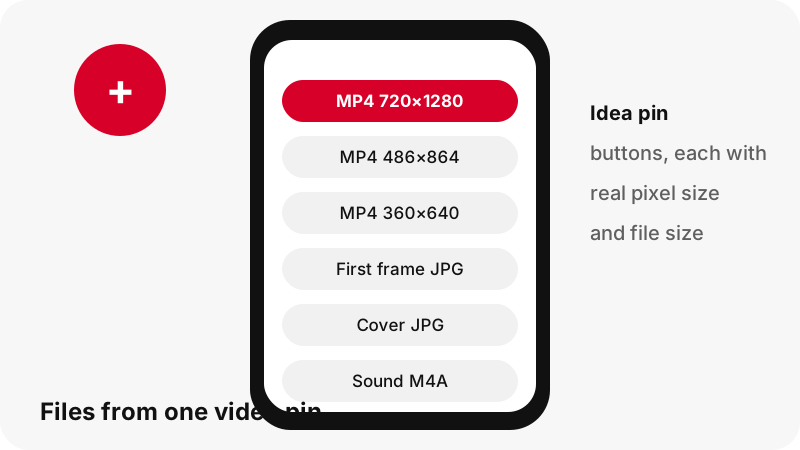
Tap the 720p button on Wi-Fi and one of the smaller MP4s on a tight data plan. Idea pins (Pinterest's short vertical videos) come with a ladder of H.264 files, and the tool lists the two lower steps next to the 720p one.
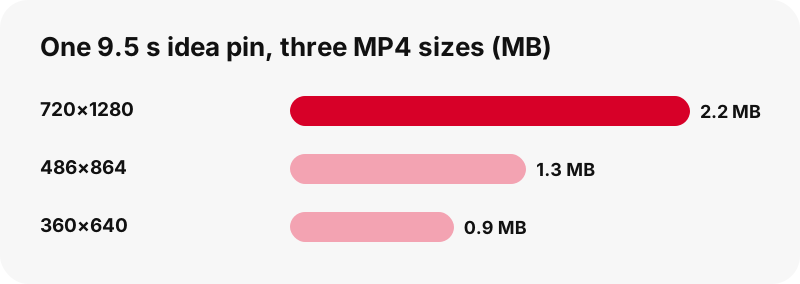
For the 9.5-second idea pin we measured, the 486×864 copy was 1.3 MB and the 360×640 copy 0.9 MB, against 2.2 MB at 720×1280. On a phone screen held upright the middle size is hard to tell apart from the top one, and it saves roughly 40 % of the data.
Classic video pins usually have a single MP4, so you see one video button plus the thumbnail and cover images. HEVC copies exist on Pinterest's servers, but we leave them out because many phones and editors cannot play them.
Where do Pinterest videos go on Android after the download?
They go to the phone's default download location. Google's Chrome help says a downloaded file is saved in your default download location, and it does not give one fixed folder path, because phone makers choose it. So instead of hunting for a path, use one of the three views below.
“To find all the files that you've downloaded to your device, open the Files app.”
Inside Chrome: the Downloads list
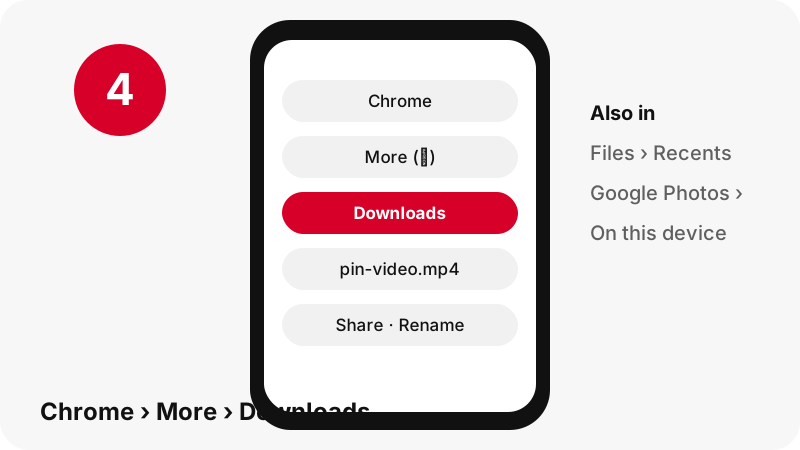
Tap the three-dot More menu at the top right and choose Downloads. If you moved the address bar to the bottom of the screen, Google says to swipe up on it to reach the same list. The newest MP4 sits at the top.
In Files by Google: Recents
Open Files by Google and look under Recents, which Google describes as the place for recently added, downloaded and modified files. Sorting by date puts the Pinterest clip first.
Why is the video not in your gallery yet?
Because a browser download lands in a device folder, not in your camera roll, and gallery apps only show some folders on their main screen. The file is there; it is just filed under a different view.
In Google Photos, Google's help points to Collections › On this device for photos and videos that came from other apps. Open the folder that holds your downloads and the MP4 plays like any other clip. You can also turn on backup for that device folder in Photos settings › Backup › Back up device folders.
Google adds a warning worth knowing: if you delete a file from the phone before its folder was backed up, it will not appear in Google Photos afterwards. Back up first, then clean up.
If your goal is the gallery itself, our page on saving a Pinterest video to the gallery goes through that case alone.
Does it work the same on Samsung and Xiaomi phones?
The download works the same with Chrome on any Android phone; the file manager is what differs. Use this table to know where to look first on the most common brands.
| Phone | App to open | Where the MP4 is | Source |
|---|---|---|---|
| Any Android with Chrome | Chrome › More › Downloads, or the Files app | Default download location | |
| Pixel and phones with Files by Google | Files by Google | Recents, then Downloads | |
| Samsung Galaxy | My Files | Downloads folder | Samsung |
| Xiaomi, Redmi, POCO | File Manager | Download category | Xiaomi |
Samsung's help says downloaded files are typically in the My Files app, under Downloads. Xiaomi lists browser downloads under File Manager › Download. Brand-specific guides: Pinterest videos on Samsung and Pinterest videos on Xiaomi.
How do you share, rename or delete the downloaded MP4?
Do it from Chrome's Downloads list, where Google documents all three actions behind each file's More menu: Share, Rename and Delete.
- Open Chrome, tap More › Downloads.
- Tap the three dots next to the Pinterest file.
- Pick Share to send it to a chat app, Rename to give it a name you will recognise later, or Delete to remove it.
- To share or delete several files at once, touch and hold them first, then tap the action.
Renaming is worth the five seconds. Downloaded clips get long, generic names, and a name such as bread-recipe-pin.mp4 is much easier to find a month later in Files or Photos.
Before you post that file anywhere public, read what Pinterest's rules and copyright law say about reusing pins. Sending a clip to a friend and re-uploading it as your own are not the same thing.
Can you add SaverPin to your Android home screen?
Yes, through Chrome, but there is no Play Store app or APK. Google's help explains that web apps let a website work like an app from your home screen or launcher.
Google's current steps for Android: open the site in Chrome, tap More on the right of the address bar, then Install and create shortcut › Install, and follow the prompts. Wording can change between Chrome versions, so trust what your menu shows.
The shortcut opens the same page you are reading now. It does not run in the background and it cannot reach private pins. Any file offered as a "Pinterest downloader APK" did not come from us. More on that in the downloader app page.
What does not work on Android, and why?
Private pins, secret boards and anything behind a login do not work, on Android or anywhere else. The tool only reads what Pinterest shows to a visitor who is not signed in, and it never asks for your Pinterest password.
- No 1080p or 4K file: Pinterest stores 720p at most, so that is what you get.
- No MP3: the audio button gives an .m4a file, the AAC track copied from the MP4. See Pinterest audio as M4A.
- No ZIP of a board: the board page lists up to 50 pins, saved one by one.
- No GIF-to-MP4: GIF pins have no MP4 copy on Pinterest; you get the original .gif.
- Links expire after one hour: paste the pin again if a button stops responding.
If something else fails, the troubleshooting guide lists each error message the tool can show and what it means.
Will the MP4 play in any Android app?
Very likely: H.264 video with AAC sound in an MP4 box is one of the most common combinations on the web. MDN's media guide lists the MP4 container as supported by all browsers. Chrome itself can play it, and so can Google Photos once you open the device folder.
That is also why we skip the HEVC copies. They are smaller, but an editor or an older phone that cannot decode them would show a black frame or no picture at all, and you would only find out after the download.
Want the still frame too? Video pins come with the first-frame image and the cover as JPG files, often at 1080×1920 for vertical clips. The thumbnail downloader explains which is which.
More Pinterest downloads on Android
The same box saves pictures, GIFs and sound. Pick the guide for the file you want, or another device you use:
- Download Pinterest images on Android (original JPG, PNG or WebP)
- Download Pinterest GIFs on Android
- Pinterest audio on Android
- How to download Pinterest videos on iPhone
- How to download Pinterest videos on PC
- Where Pinterest downloads go on every device
Frequently asked questions
Do I need to install an app to download Pinterest videos on Android?
No. Chrome saves the MP4 directly from this page. There is no APK or Play Store app from SaverPin; you can add the site to your home screen from Chrome's menu if you like.
Where is the downloaded Pinterest video on my Android phone?
In the default download location. Open Chrome › More › Downloads, or the Files app, which Google says shows every file downloaded to the device.
Why can't I see the video in Google Photos?
Browser downloads sit in a device folder. In Google Photos open Collections › On this device and pick the folder with your downloads.
What quality will the video be?
Up to 720p, because that is the largest MP4 Pinterest stores. Each button shows the real size, for example 720×1280 or 576×1024, before you tap it.
Which file should I choose on mobile data?
For idea pins, the 486×864 or 360×640 MP4. In our test of a 9.5-second clip they were 1.3 MB and 0.9 MB instead of 2.2 MB.
Does the video keep its sound?
Yes, when the pin has a sound track: the MP4 carries the original AAC audio. If a pin is silent, the audio button tells you so instead of giving you an empty file.
Does it work with pin.it links from the Pinterest app?
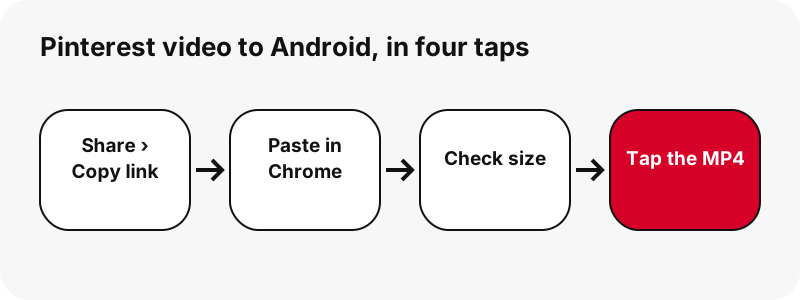
Yes. Share › Copy link often gives a pin.it short link; the tool follows it to the pin, or to the board if the link points to one.
Can I download private Pinterest videos on Android?
No. Private pins and secret boards need a login, and the tool never asks for your Pinterest account. See our page on private pins for what is possible.
Does it work on Samsung Internet or other browsers?
The page works in modern Android browsers, but where the file lands is each browser's own setting. We only document Chrome here, because Google publishes its download steps.
Why did the download button stop working?
Download links are signed and expire after one hour. Paste the pin link again and you get fresh buttons.
Is SaverPin part of Pinterest?
No. SaverPin is an independent tool with no link to Pinterest, Inc. It only reads pins that are public.
Is a downloaded Pinterest video mine to repost?
No. Downloading gives you a copy; the creator keeps the copyright. Ask them before reposting, and read our page on whether downloading Pinterest videos is legal.
Guides
Video — Paste a pin link and save the video as MP4, up to 720p.
Sources
- Download a file (Chrome for Android) — Google
- Use web apps (Chrome for Android) — Google
- View your files in Files by Google — Google
- Find items from other apps and devices in Google Photos — Google
- Download an image — Pinterest Help Center
- Where to find downloaded files on a Samsung phone — Samsung
- Where are browser downloads saved — Xiaomi
- Media container formats — MDN Web Docs