Can you save a Pinterest video without watermark for free?
Yes. When you save Pinterest video without watermark through SaverPin, nothing is drawn on the clip: there is no username strip, no site badge and no closing card. The file you keep is the same one Pinterest's player loads, so it is as clean as the version you watched in the feed.
There is no sign-up, no fee and nothing to install. You copy the pin's link, paste it here and pick a file. The whole job happens in the browser you already use, on a phone, a tablet or a computer.
One limit is worth knowing before you start. A clean save keeps the clip exactly as the creator uploaded it. If they burned their name, a channel logo or a caption into the frames, those pixels belong to the video and stay where they are. SaverPin is a saver, not an editor.
Why do videos saved from the Pinterest app carry a username?
Because that is how Pinterest's built-in download works. Creators of full-screen video Pins can let people download them, and Pinterest then prints the creator's username along the bottom of the copy that leaves the app.
“If you turn on the download option, your full-screen video Pins can be downloaded and a watermark of your username will appear at the bottom.”
Pinterest's page also says the switch only covers full-screen, 9:16 video Pins, and that creators find it under Social permissions › Video Pin downloads. Older, regular video pins have no such button at all.
In short, the stamp is a credit line. Pinterest adds it so the creator's name travels with the clip, which is useful to know when you later decide how to use what you saved.
What file does SaverPin hand you instead?
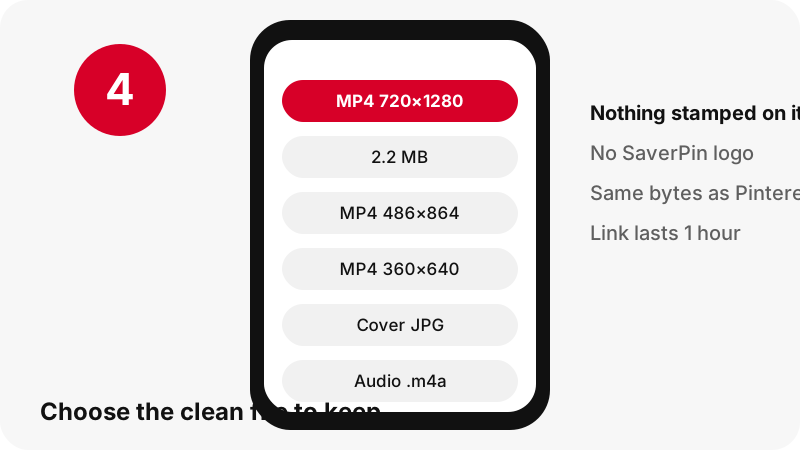
You get the playback file itself. SaverPin never taps Pinterest's download option. It reads the public data behind the pin, which names the video files the player streams, and passes you a temporary link to one of them.
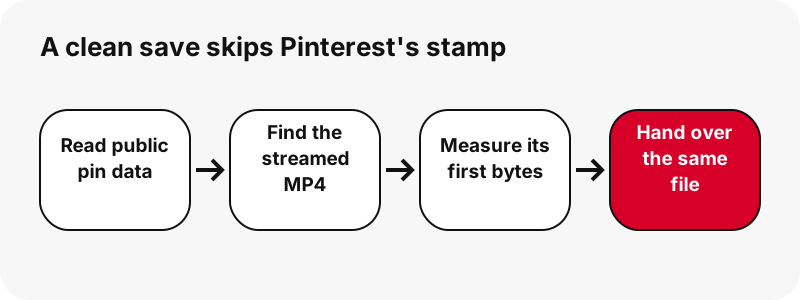
- Regular video pins: the MP4 that Pinterest marks as its 720p copy, with H.264 picture and AAC sound.
- Idea pins (the tall, Reels-like format): the data only names a streaming playlist, so SaverPin works out where the 720p MP4 sits and checks that it is really there. Two lighter MP4s are offered next to it.
- Every button: the first bytes of the file are read before you see it, so the width, height and megabytes shown are measured, not guessed.
No step in that chain decodes or re-compresses the video. The bytes travel from Pinterest's servers through our download link to your device, and we keep no copy of them.
What is the best way to save Pinterest video without watermark?
There are three common ways to keep a Pinterest clip: Pinterest's own button, a screen recording, and a saver like this one. They differ in the stamp, in which pins they cover and in how faithful the copy is. The Pinterest column below comes from its help pages; ours comes from the tool's code and our own tests.
| What you care about | Pinterest's Download | Screen recording | SaverPin |
|---|---|---|---|
| Username stamp at the bottom | Yes, per Pinterest help | No, but app buttons appear | No |
| Pins covered | Full-screen 9:16 video Pins with downloads allowed | Anything you can play | Any public video pin or idea pin |
| Picture quality | Not described in Pinterest help | Re-encoded, usually softer | Original stream, not re-encoded |
| Clip length | Whole clip | Needs trimming | Whole clip |
| Account needed | Used inside Pinterest | No | No |
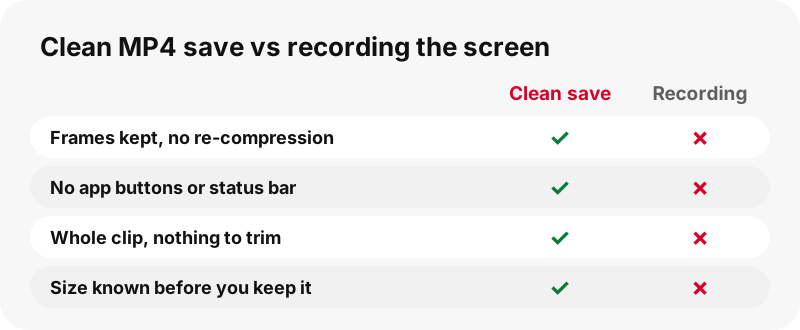
A recording can look fine on a small screen, but it is a copy of a copy: your phone captures the display, then squeezes it into a new file. Saving the MP4 skips that second round of compression.
Why can't a watermark-free saver wipe marks inside the picture?
Because nothing in SaverPin touches frames. It does not crop, blur, cover or repaint any part of the video, so a handle typed on screen, a studio logo or the badge of the app the clip was first edited in will still be visible in the file you keep.
Part of this is how the tool is built: it streams a file that already exists and never opens the picture. Part of it is a decision. A visible mark usually tells viewers whose work they are watching, and scrubbing it out to present a clip as your own is the use creators complain about most.
Need a version without the creator's own mark, for a class project or a client pitch? Message the creator and ask for the source file. Plenty of them say yes when you offer a credit and a link.
Which marks stay and which never appear when you save?
Video can carry two families of marks: ones you see and ones hidden in the data. Wikipedia's article on digital watermarking covers both and the reason they exist.
“It is typically used to identify ownership of the copyright of such a signal.”
| Mark | Found in | Does SaverPin add it? | Is it in your saved file? |
|---|---|---|---|
| Username strip from Pinterest's own Download | Bottom of the downloaded copy | No | No, that button is never used |
| Handle or logo filmed or typed by the creator | Every frame of the clip | No | Yes, unchanged |
| Text or sticker added in Pinterest's editor | The pin's picture | No | Yes, unchanged |
| Hidden digital watermark | The encoded signal | No | Kept as is, since the file is not altered |
So "without watermark" here has a narrow, honest meaning: no stamp from Pinterest's download button and nothing from us. Anything that was in the video before it reached Pinterest is still there.
How sharp and how heavy is a clean saved video?
It is exactly as sharp as the Pinterest stream, because it is the Pinterest stream. For most pins that means 720p at the top. In our tests, an idea pin whose source was listed at 1080×1920 still had 720×1280 as its biggest MP4, so we never promise 1080p or 4K.
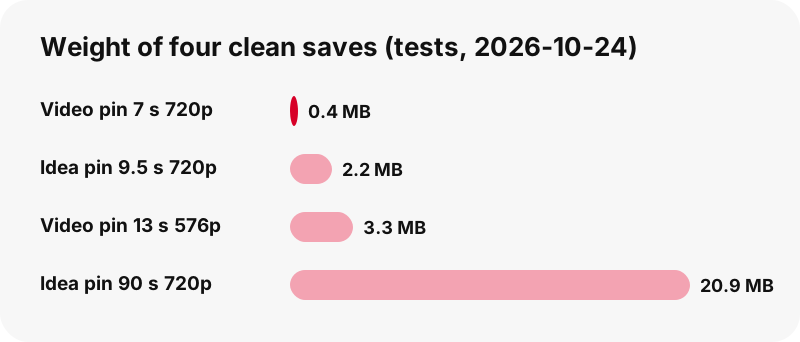
Weights from our 2026-10-24 tests: a 7-second video pin at 720×1280 came to 0.4 MB, a 9.5-second idea pin at 720×1280 to 2.2 MB, a 13-second video pin at 576×1024 to 3.3 MB, and a 90-second idea pin at 720p to 20.9 MB. Phone storage is rarely the problem; slow mobile data can be.
For what "HD" can and cannot mean on Pinterest, see the HD video downloader. Bit rates and resolutions are broken down in Pinterest video quality explained.
Is a Pinterest video downloader without watermark also clean for photos, GIFs and sound?
Yes. The no-stamp rule covers every SaverPin mode, not just video. Pictures arrive as the original upload, GIFs as the original animation, and sound as an .m4a lifted straight from the MP4 on your own device.
- Photos: the uploaded original rather than the 736-pixel preview. One tested pin gave 1365×1706. Use the image downloader.
- GIFs: the original animated .gif and a still JPG. Pinterest has no MP4 version of GIF pins to offer. Use the GIF downloader.
- Cover images: full-size JPG covers and first frames from the thumbnail downloader.
- Audio: an .m4a copy of the AAC track, not an MP3, made in your browser. See Pinterest to MP3.
- Whole boards: up to 50 pins of a public board, each saved one by one, with the board downloader.
Idea pins with several pages list each page separately, up to 20, so you can keep only the slides you need.
When will a pin refuse to save?
Clean or stamped, nothing can be saved from a private pin, a secret board or any page that needs a Pinterest login. SaverPin reads only what a logged-out visitor can see, and it never signs in for you.
- A pin that was deleted or taken down returns no files.
- Profile pages and board sections are not accepted; paste the link of one pin or one public board.
- Captions and subtitles are not available as separate files.
- There is no ZIP of a whole board, no browser extension, no APK and no desktop program.
The reasons private pins stay closed are laid out in download private Pinterest videos. If a public pin still fails, run through Pinterest video download not working.
Where does a clean saved clip end up on my phone or computer?
In your browser's download folder. Apple's guide to finding downloads says that on iPhone and iPad, files from the web go to the Downloads folder in the Files app. From there you can move a video into Photos.
For Android, Chrome's help says files go to the default download location and appear in the Files app. Windows and Mac browsers use the Downloads folder unless you changed it.
Step-by-step help lives in where do Pinterest downloads go and save a Pinterest video to the gallery, plus device guides for iPhone, Android, Samsung and PC.
What may I do with a video I saved without a watermark?
Keep it for yourself, and treat it as the creator's work. When you save Pinterest video without watermark, the clip still has an owner, and posting it as your own can break copyright law even if nobody's name shows on screen.
- Saving a recipe, a workout or a craft tutorial to watch offline is the typical, low-risk use.
- Before putting a clip in your own posts, ads or edits, get the creator's permission.
- If you get a yes, name the creator and link to them, since the copy itself will not do it for you.
- A creator who switched Pinterest downloads off is telling you they would rather people watch on Pinterest.
Pinterest's copyright policy explains how rights holders report copies, and the U.S. Copyright Office's fair use index lists the factors courts look at. We sum it up in plain words on is it legal to download Pinterest videos.
Which other SaverPin tools work with the same link?
The same pin link fits every tool below. Each one follows the same rule as this page: it measures the files first and adds nothing to them. For an overview of everything you can keep, start at the Pinterest saver.
Frequently asked questions
Does it cost anything to save a Pinterest video without watermark here?
No. SaverPin is free, needs no account and installs nothing. There are no ads at launch.
Will my saved video show a SaverPin logo?
No. We add no logo, no username strip and no intro or outro. The file is the one Pinterest streams, untouched.
Why is there a name at the bottom of videos I downloaded inside Pinterest?
Pinterest's help explains that when a creator allows downloads of full-screen video Pins, the downloaded copy shows their username at the bottom. SaverPin does not use that button.
Can SaverPin blur or crop out a creator's logo?
No. It never edits frames, so a logo, handle or caption inside the video stays. Ask the creator for a clean original if you need one.
Does saving without the stamp lower the quality?
No. The video is not re-encoded. You get the same file Pinterest plays, which is 720p at most for most pins.
Can I get the video in 1080p or 4K?
No. In our tests the largest MP4 Pinterest offered was 720p, even for a pin whose source was listed at 1080×1920. We will not promise a resolution that does not exist.
How do I save a Pinterest video without watermark on an iPhone?
Open SaverPin in Safari or another browser, paste the pin link and tap Download. The MP4 goes to the Downloads folder in the Files app, as Apple's help describes.
Are idea pins supported?
Yes. For idea pins, SaverPin finds the 720p MP4 behind the streaming playlist and also offers two lighter MP4s. Multi-page idea pins list up to 20 pages.
Is there an app or APK to install?
No. SaverPin has no APK and nothing in the app stores. The site runs in any modern browser, and you can add it to your home screen.
What if the creator turned off downloads?
A public video can still be listed, because SaverPin reads public pin data. The creator's choice still matters: keep the clip for personal use and ask before reusing it.
Do you store the videos I save?
No. Files stream from Pinterest's servers through a link that expires after one hour, and we keep no copy.
Does a clip with no visible mark become free to repost?
No. Copyright stays with the creator whether or not their name is on screen. Reposting without permission can infringe it.
Is SaverPin run by Pinterest?
No. SaverPin is independent and is not affiliated with or endorsed by Pinterest. Everything it saves comes from pins anyone can already open.
Guides
Video — Paste a pin link and save the video as MP4, up to 720p.
Sources
- Create a Pin from an image or video (Allow downloads and sharing) — Pinterest Help Center
- Interact with Pins — Pinterest Help Center
- Copyright — Pinterest Policy
- Digital watermarking — Wikipedia
- U.S. Copyright Office Fair Use Index — U.S. Copyright Office
- Find your downloads on iPhone or iPad — Apple Support
- Download a file (Chrome on Android) — Google Chrome Help