How do you save Pinterest Reels without installing an app?
You save Pinterest Reels by pasting the clip's link into a web tool that fetches the underlying video file for you. Pinterest's own Save button only pins the clip to one of your boards; it does not put a file on your phone, so the clip disappears from your reach the moment the creator deletes it.
SaverPin works as an idea pin saver inside the browser you already use. There is nothing to install, no Pinterest sign-in and no account to create. You paste, you tap, and the result card lists each real file with numbers you can check before you commit any storage to it.
Typical reasons people want to save Pinterest Reels offline: a recipe to cook from without signal in the kitchen, a hair tutorial to replay step by step, a workout routine for the gym, or a craft demo to watch on a flight. In each case a local MP4 beats a bookmark, because a bookmark needs the internet and the original pin.
This mode is tuned for short vertical clips. For any other video pin, the Pinterest to MP4 page explains the general route, and the Pinterest saver page covers pictures, GIFs and videos from one box.
What does Pinterest actually call the clips people name Reels?
Pinterest never adopted the word Reels. The term travelled over from Instagram and Facebook, and searchers use it because the format looks the same: full screen, vertical, a few seconds to a couple of minutes. Inside Pinterest the format has carried the names Story pins, then idea pins, and today the help center groups them under video Pins.
“Video Pins feature a single video or multiple videos and images in one Pin. You can add effects like text overlay, stickers and more to make them interactive.”
That mix of clips and stills in one post explains why a reel saver has to handle more than a single video. A post can be one clip, one clip plus a cover image, or a sequence of pages where some move and some do not.
Music matters too. According to the Wikipedia entry on Pinterest, the company brought licensed tracks from major record labels into idea pins in October 2022. Many vertical clips therefore come with a soundtrack, which is why SaverPin offers the sound on its own as well.
Which files can a Pinterest idea pin saver pull from one clip?
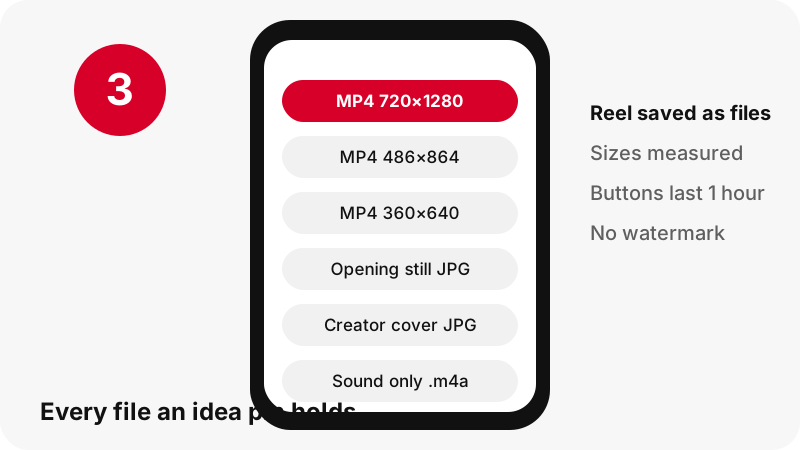
For a typical single-page idea pin, the card offers three MP4 sizes, two still images and the sound. You pick per button, so saving the full video does not force you to also download the cover, and vice versa.
| What you tap | File type | Size we usually see | Good choice when |
|---|---|---|---|
| Largest video | MP4, H.264 picture, AAC sound | 720×1280 | You want to keep the clip for good or watch it on a laptop |
| Middle video | MP4, H.264 picture, AAC sound | around 486×864 | Storage on your phone is tight |
| Lightest video | MP4, H.264 picture, AAC sound | around 360×640 | Your signal is weak or you pay per megabyte |
| Opening still | JPG | full frame, for example 1080×1920 | You need a thumbnail of the first shot |
| Creator's cover | JPG | the size it was uploaded at | You want the image shown in the feed |
| Sound only | M4A (AAC) | a few dozen to a few hundred KB | Only the voice or music interests you |
Why the sound comes as M4A, not MP3
The audio track inside the MP4 is AAC. SaverPin lifts it out unchanged, on your own device, and wraps it as an .m4a file, so no quality is lost to a second compression. Most music players open M4A directly. The Pinterest to MP3 page explains the choice in more depth.
How does SaverPin find an MP4 behind a streamed reel?
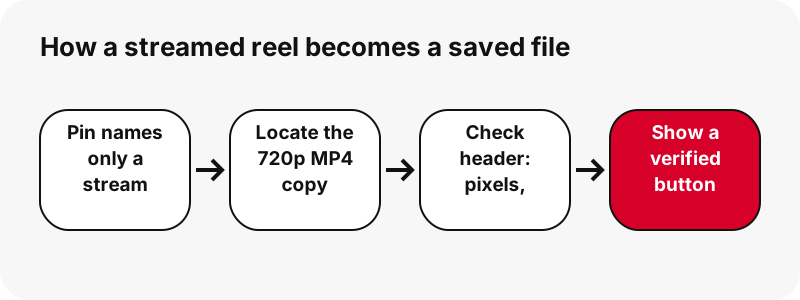
Vertical clips are delivered as a stream, not as one file. When you scroll the feed, the Pinterest player receives a playlist that points to many short chunks, then switches between quality levels as your connection changes. That approach is called HTTP Live Streaming, or HLS.
“A list of available streams, encoded at different bit rates, is sent to the client using an extended M3U playlist.”
Unlike an older video pin, an idea pin's public data often names only that playlist. A simple saver that looks for an MP4 address in the pin data therefore comes back empty and tells you the pin has no video, which is false.
SaverPin takes the extra step. From the playlist name it works out where the matching progressive MP4 copies live on Pinterest's servers, requests the opening bytes of each candidate, and reads the real width, height and length from the file header. A button only appears for a file that answered that check.
How much storage do saved Pinterest Reels take?
Very little, so you can save Pinterest Reels freely: our test clip of under ten seconds weighed about 2 MB at the top size, and a ninety-second one came in near 21 MB. The figures below come from files we fetched on 2026-10-24; a clip full of fast motion will be heavier than a calm talking-head video of the same length.
| Clip we measured | Top MP4 | Lighter MP4s | Sound file |
|---|---|---|---|
| Idea pin lasting 9.5 seconds | 720×1280 · 2.2 MB | 486×864 · 1.3 MB, 360×640 · 0.9 MB | 80 KB |
| Idea pin lasting 90 seconds, uploaded at 1080×1920 | 720×1280 · 20.9 MB | shown on the card | about 738 KB |
| Older-style video pin of 13 seconds, for contrast | 576×1024 · 3.3 MB | no lighter copy | 109 KB |
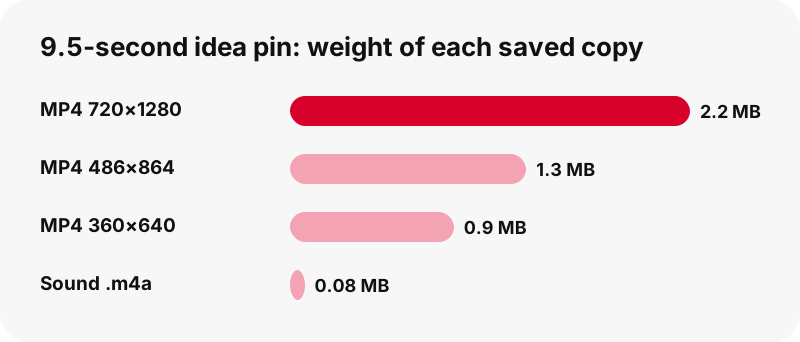
Put differently, a phone with 1 GB free can hold several hundred of those short clips at the top size. The middle copy of the 9.5-second test was roughly 40 % lighter than the largest, and the smallest roughly 60 % lighter, which adds up quickly when you collect a whole series.
Should you keep the 720p copy, a lighter MP4 or just the sound?
When you save Pinterest Reels, keep the 720×1280 file by default. It is the sharpest copy available and still light. Step down only when bandwidth, space or a sending limit matters more than fine detail.
Match the copy to what you will do with it
- Following along with a tutorial (knitting, makeup, a cake decoration): 720×1280, because small on-screen captions blur at lower sizes.
- Forwarding to someone over a messenger: the middle 486×864 file looks fine on a phone and sends faster.
- Saving on hotel Wi-Fi or abroad: start with 360×640, then fetch the larger one later if you still have the card open within the hour.
- Building a playlist of tracks or voice-overs: tap the sound button only; the 9.5-second test gave an 80 KB file.
Every MP4 on the card pairs H.264 picture with AAC audio, a combination that plays on practically any phone, tablet, smart TV or computer without an extra player. The Advanced Video Coding article on Wikipedia calls H.264 by far the most commonly used format for recording, compressing and distributing video.
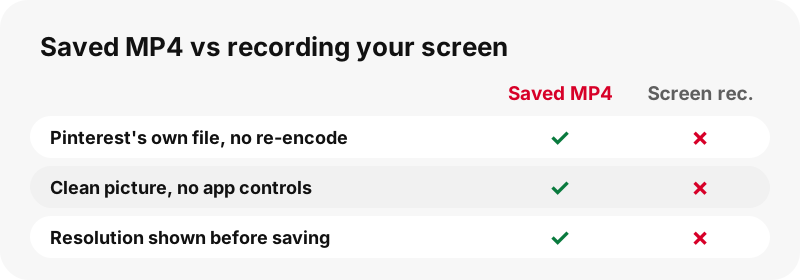
A screen recording might seem like a shortcut, but it re-encodes the picture, captures the app's buttons and progress bar, and often misses the sound. The saved MP4 is the file Pinterest itself serves.
Why will no Pinterest reels downloader give you a true 1080p file?
Because the 1080p version is not there to fetch. In our 2026-10-24 tests, a clip uploaded at 1080×1920 still topped out at 720×1280, both in its streaming playlist and among its MP4 copies. Pinterest scales vertical clips down to that size when it processes them.
When a site advertises 1080p, 2K or 4K Pinterest reels, it is either stretching a 720p file or printing a label it never verified. Stretching adds megabytes, not detail. SaverPin prints the measured size on every button instead, so the number you see is the number you get.
Some clips also exist as HEVC (H.265) copies. We leave those out on purpose: plenty of browsers, older Windows PCs and budget Android phones cannot open HEVC without extra codecs, and a file that refuses to play is useless however efficient it is.
For the long version of this topic, see how Pinterest video quality works, and for a direct answer to the HD question, the Pinterest HD video downloader page.
What happens when an idea pin has several pages or slides?
Each page gets its own row on the card. You choose page by page instead of receiving one stitched-together video, which means you can keep slide 4 and skip the rest.
- Still pages arrive as the original upload, in whichever format the creator used: JPG, PNG or WebP.
- Moving pages are treated like separate clips, each with its MP4 sizes, opening still and cover.
- Carousel pins list up to 20 slides, every slide with its own set of buttons.
To be transparent: nearly every idea pin we found in testing had a single page, and we could not locate a live one with several video pages. The tool processes such pins page by page, but we have not watched that case end to end.
Carousels are confirmed, though. A 13-slide carousel containing 7 video slides at 720×900 did come back fully listed in about 1.8 seconds.
When the slide you want is a picture, the Pinterest image downloader shows how the original upload compares with the 736-pixel preview the feed displays.
Where do the reels you save end up on each device?
They land in the browser's download folder, not straight in your photo gallery. Moving a clip into Photos or Gallery is a second, short step whose path depends on the phone.
iPhone and iPad
Safari puts the MP4 in the Downloads folder of the Files app, as Apple confirms in its help article about finding downloads. Open it there and use the share sheet to choose Save Video. The iPhone reels guide and the iPhone video guide walk through it with screenshots of each step.
Android phones
Chrome writes the file to the default download location, and Google's Chrome help notes that the Files app lists everything you have downloaded. Most gallery apps pick up the Download folder on their own. See saving Pinterest reels on Android or the gallery guide if the clip does not show up.
Windows and Mac
On a computer the clip goes to the usual Downloads folder. The PC reels guide and the Mac reels guide cover renaming and sorting, and where saved Pinterest files go maps every browser and system in one place.
When can't you save Pinterest Reels?
A reel will not save when Pinterest only shows it to signed-in or invited users. SaverPin reads what the public can see and never logs in on your behalf, so a pin on a secret board or a private account stays private. A quick test: if the pin will not open in an incognito window, it will not open here either.
- A pin the creator deleted, or one Pinterest took down, has no files left to list.
- A profile page or a board section link is not a pin; open one clip and copy its own link.
- On-screen captions are part of the picture; there is no separate subtitle file to download.
- There is no bulk ZIP for dozens of reels. A public board can be opened pin by pin in the board downloader, which lists up to 50 pins.
Whatever the cause, the card names the problem in a sentence rather than handing you an empty or broken file. A longer troubleshooting list is on Pinterest video download not working, a missing soundtrack is covered on Pinterest video has no sound, and the limits around locked content are spelled out on private Pinterest videos.
What does SaverPin do with the reels you save?
Nothing beyond passing them along. The file travels from Pinterest's servers to you through a signed link that SaverPin issues on the spot; no copy of the video is stored on our side. That link is valid for one hour, so a button you bookmark or forward will stop working after that.
Separating the sound is done entirely inside your browser. The audio never makes a round trip to our server. What the server does see, such as the pin address you submit, is listed on the privacy page.
The clips you save carry no SaverPin watermark, intro card or logo. You receive Pinterest's own file, byte for byte; the no-watermark page explains what that means for clips that already show a creator's mark.
Can you post a saved Pinterest reel on your own account?
Not freely. Keeping a clip for your own reference is a different act from uploading it as your content, and the second can breach the creator's copyright. Pinterest's copyright policy describes how rights holders can have unauthorised copies removed.
A fair approach: save Pinterest Reels for private use, message the creator if you would like to feature their work, and name and link them clearly once they agree. Before you reuse any clip in a video of your own, read is it legal to download Pinterest videos.
Which other SaverPin tools work on the same pin?
The same link can give you a still, a GIF or a whole board. Each tool below uses the same box and the same measured labels, and the app page shows how to pin SaverPin to your home screen.
Frequently asked questions
Is there a Reels section on Pinterest?
No section carries that name. The vertical clips people call Pinterest Reels are idea pins, which Pinterest now files under video Pins. This page uses the word Reels because that is how many people search.
Does Pinterest's own Save button download the reel?
No. It adds the pin to one of your boards inside Pinterest. No file reaches your phone, and the pin vanishes from your board if the creator deletes it.
Can SaverPin work as a Pinterest idea pin saver?
Yes, that is what this mode is for. Paste the idea pin link, tap Download, and the tool locates the 720p MP4 behind the stream, checks it and shows its measured size.
Will an old Story pin link still work?
If the pin is still public, yes. Story pins became idea pins, and the tool reads them the same way, listing every page on its own.
What is the highest quality I can save Pinterest Reels in?
720×1280. That is the largest copy Pinterest keeps for these clips, even when the creator uploaded 1080×1920. Anything labelled 1080p elsewhere is an enlarged 720p file.
Does the saved MP4 keep the music?
Yes, as long as the clip has a soundtrack; it is stored as AAC inside the MP4. For a silent clip, the sound button tells you there is no track rather than giving you an empty file.
How do I keep only the song from a reel?
Tap the sound button. Your browser copies the AAC track out of the MP4 into an .m4a file without re-encoding it. It is not converted to MP3; see the Pinterest to MP3 page for why.
Do I have to log in to Pinterest first?
No. SaverPin never asks for Pinterest credentials and only reads public pins. The pin link is all it needs.
Can I save Pinterest Reels on a laptop or desktop?
Yes. The box works the same in Chrome, Edge, Firefox or Safari on Windows, macOS, Linux and ChromeOS. The MP4 lands in your Downloads folder.
Can I paste a pin.it link from the share menu?
Yes. Short pin.it links are followed to the pin behind them. If the short link points to a board instead, board mode takes over and lists up to 50 pins.
Can I save every reel from one creator in one go?
No. Profile pages are not accepted. You can paste single pins one by one, or open a public board in the board downloader to go through its pins.
Why did my download button stop working?
Buttons expire one hour after they are created. Paste the pin link again to get fresh ones.
Is there a mobile app for saving Pinterest Reels?
There is no APK or app store version. SaverPin runs in your mobile browser, and you can add it to your home screen so it opens like an app.
Does SaverPin have any connection to Pinterest?
None. SaverPin is independent and not affiliated with Pinterest, Inc. It only fetches pins that anyone can already view publicly.
Guides
Video — Paste a pin link and save the video as MP4, up to 720p.
Sources
- Types of Pins on Pinterest — Pinterest Help Center
- Share Pins, boards, and profiles — Pinterest Help Center
- Copyright — Pinterest Policy
- HTTP Live Streaming — Wikipedia
- Pinterest — Wikipedia
- Advanced Video Coding — Wikipedia
- Find your downloads on iPhone or iPad — Apple Support
- Download a file (Chrome on Android) — Google Chrome Help