Is Pinterest to MP3 really MP3?
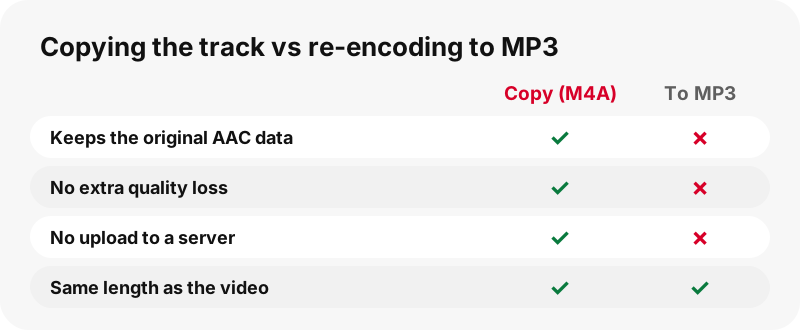
No, and we would rather tell you up front. Pinterest to MP3 on SaverPin gives you an .m4a file. Pinterest videos carry their sound as AAC, and the tool copies that AAC track out unchanged. Turning it into MP3 would mean decoding and encoding the sound again, which loses quality.
Many sites say MP3 because that is the word people search for. The honest result is an M4A that sounds identical to the pin, is usually smaller than an MP3 of similar quality, and opens in the same places most people play music. The rest of this page explains why.
What is an M4A file?
An M4A file is an MP4 file that holds only sound. Wikipedia's article on the MP4 file format states it in one line:
“Audio-only MPEG-4 files generally have a .m4a (MPEG-4 Audio) extension.”
So the M4A you save is the same family of file as the Pinterest video, minus the picture. The sound inside is Advanced Audio Coding, which Wikipedia describes as an audio coding standard for lossy digital audio compression, and by 2017 a de facto industry standard.
Why not convert the sound to MP3?
Because converting would make it worse, not better. The AAC sound in a Pinterest video is already compressed. Encoding it into MP3 means decoding it, then compressing it again with a different method, and each lossy pass throws away more.
“Transcoding is commonly a lossy process, introducing generation loss”
A copy avoids this. The bytes of the sound track move from the MP4 into the M4A without being decoded, so the result is exactly what Pinterest encoded. That is the best quality any Pinterest to MP3 tool can honestly offer.
How does the audio extraction work?
It works entirely in your browser. When you tap the audio button, your device downloads the MP4 through our one-hour link, reads the file's structure, finds the AAC track, and writes those samples into a new .m4a container. No server touches the sound and no file is uploaded.
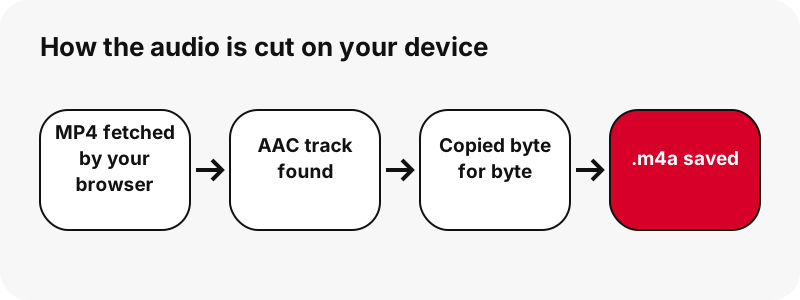
Two side effects follow. First, the work uses your device's memory, so a very long clip takes a moment on an older phone. Second, the full MP4 is fetched, so the data you spend equals the video size, not the M4A size.
How big is the M4A file?
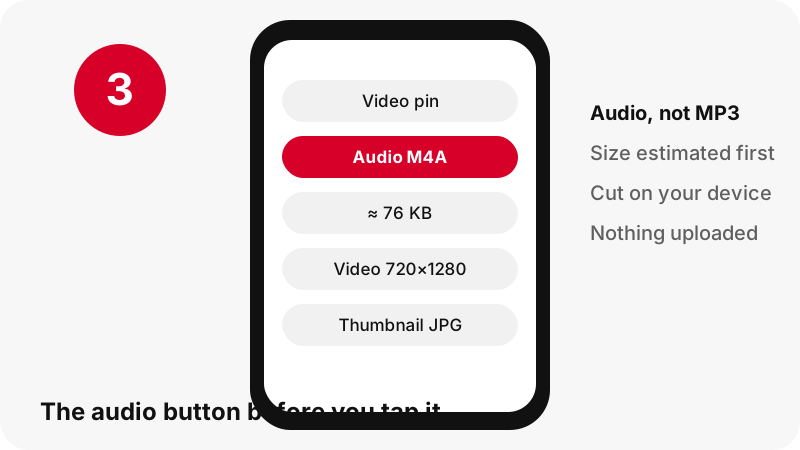
Small: the sound of a short pin is usually well under a megabyte. The card shows an estimate before you tap, such as ≈ 76 KB, and here are the real files from our tests on 2026-10-24.
| Pin tested | Length | MP4 size | M4A size |
|---|---|---|---|
| Idea pin | 9.5 s | 2.2 MB | 80 KB |
| Classic video pin | 7 s | 0.4 MB | 58 KB |
| Classic video pin | 13 s | 3.3 MB | 109 KB |
| Idea pin | 90 s | 20.9 MB | ≈ 738 KB |
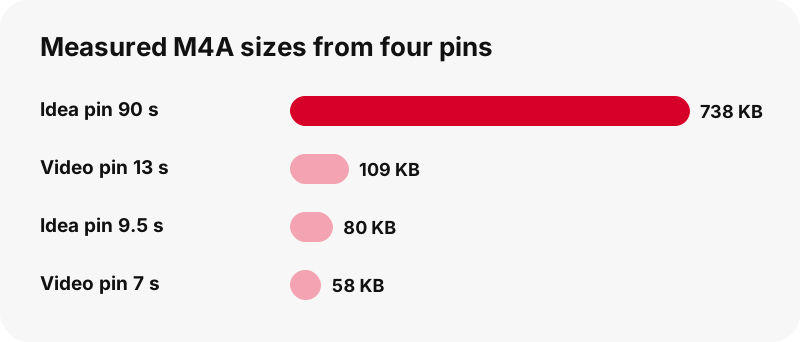
Our own arithmetic on those four files gives roughly 65 to 68 kilobits per second of sound in every case. That is a modest bit rate, fine for voices and background music, and it is what Pinterest chose, not something we reduced.
Does it work on every Pinterest video?
It works on every public pin that has a sound track. It cannot work on a video uploaded silent, because there is nothing to copy. Instead of saving an empty file, the tool says that the video has no sound track.
It also refuses pins that are not videos. A picture pin or a GIF has no sound, so the page answers with a short note rather than an error. For carousels, each video slide has its own sound, so pick the slide you want first.
If you expected sound and got that message, the no-sound guide lists the usual reasons.
Where can you play an M4A file?
Most music players, phones and computers open M4A. The table lists what we could confirm from official help pages; where no official page names an app, we say so.
| System | M4A / AAC support | Source |
|---|---|---|
| Windows | Windows Media Player lists AAC and M4A as supported | Microsoft Support |
| ChromeOS | .m4a is in the supported media file list | Chromebook Help |
| Firefox | Plays AAC using the operating system's own AAC support | MDN Web Docs |
| Apple devices | Apple says its apps work with many media formats; no page we found names the M4A app | Apple Support |
In our own test, the saved M4A played in Microsoft Edge with the correct duration.
What if an app insists on MP3?
Then you can convert the M4A yourself, knowing it will cost a little quality. Some older car stereos, ringtone tools and upload forms accept only .mp3. In that case any audio editor or converter on your device can export the M4A as MP3.
Do that conversion once, from the M4A you saved, and keep the M4A as your master copy. Converting again from an MP3 stacks another loss on top. If the destination accepts AAC or M4A, skip the conversion entirely: it will sound exactly like the pin.
Is the sound quality the same as on Pinterest?
Yes, it is bit-for-bit the same sound that plays inside the pin. Nothing is resampled, normalised or re-compressed. If the audio sounds thin or noisy, that is how it was uploaded or encoded by Pinterest, and no Pinterest to MP3 tool can restore what is missing.
For the same reason, a site promising 320 kbps MP3 from a Pinterest pin is only making a bigger file. The extra bits describe the same 65-ish kbps sound.
Pinterest MP3 download on iPhone, Android and PC
The steps are the same on every device; only the download folder changes. Tap Get audio, wait while the sound is cut, and the browser saves the .m4a like any other download.
- iPhone and iPad: internet downloads go to the Downloads folder in the Files app, according to Apple Support.
- Android with Chrome: the file goes to the default download location; Google's help says to open the Files app to find it.
- Windows, Mac, Chromebook: the browser's Downloads folder.
Device guides: Pinterest audio on iPhone, on Android and on PC.
Why is nothing uploaded?
Because the cutting happens on your device, there is no reason to send the file anywhere. Our server only resolves the pin and signs a short download link. The video bytes go from Pinterest's servers to your browser, and your browser builds the M4A.
This keeps the audio private and keeps the tool cheap to run, which is why it can stay free. It also means the tool cannot help if your browser blocks downloads or is very old. A current version of Chrome, Edge, Safari or Firefox is enough.
Can you get the audio from a whole board?
Not in one go. The board downloader lists up to 50 pins of a public board, and each pin is then resolved on its own. To save the sound of several pins, open each video pin's link on this page and tap Get audio for each one.
There is no ZIP and no batch audio export. That limit is deliberate: cutting audio uses your device's memory, and doing fifty clips at once would freeze many phones.
What if the audio cannot be cut?
If something in the file is unusual, the tool stops and says it could not cut the audio, then suggests saving the MP4 instead. That fallback always works, because the MP4 already holds the full sound track and plays in any video or music app.
Common causes are a download that was interrupted, a link older than one hour, or a browser that ran out of memory on a long clip. Paste the pin link again for a fresh link and retry. If the pin itself will not load, the not-working guide goes through each error message.
We would rather show that message than hand you a file that looks fine and plays silence. Every Pinterest MP3 download request either gives a real M4A or an honest reason.
Music in Pinterest videos: who owns it?
Usually not the person who pinned it, and not you. Many pins use popular songs, and those recordings belong to artists and labels. Saving a clip's sound to listen to offline is a personal use; reposting the song, selling it or using it in your own videos needs a licence.
The U.S. Copyright Office notes that whether a use is fair depends on all the circumstances, and that in cases of doubt it recommends getting permission. Pinterest's copyright policy explains how owners report infringements. Our legal guide covers this in plain words.
Video or audio: which download do you need?
Choose audio when you only care about the voice or music, for example a recipe narration, a workout count or a language-learning clip. Choose the video when the picture matters or when you might want the sound later anyway.
The MP4 already contains the full sound track, so saving the video loses nothing. The Pinterest to MP4 page gives you the file with both tracks, and the HD page explains which MP4 is the largest.
Frequently asked questions
Does SaverPin make real MP3 files?
No. It saves the original AAC sound as an .m4a file. Re-encoding to MP3 would lose quality, so we copy the track as it is and say so plainly.
Will my phone play an M4A file?
Most phones and music players do. Windows Media Player lists M4A and AAC as supported, and ChromeOS lists .m4a among its media files. If one app refuses it, try another player.
Can I rename the .m4a file to .mp3?
Renaming does not change the format inside. Some players cope, many do not. If you need a true MP3, convert the M4A with an audio converter, accepting a small quality loss.
Why does the audio button show an estimated size?
The exact size is only known once the track is copied. The estimate, such as ≈ 76 KB, is close enough to plan for storage.
Is my audio uploaded to your server?
No. Your browser fetches the MP4 and builds the M4A on your device. The server only reads the public pin and signs a one-hour download link.
Why does it say the video has no sound?
Because the MP4 has no audio track: the pin was uploaded silent. The tool checks this instead of giving you an empty file.
Can I get audio from a Pinterest image or GIF?
No. Pictures and GIF pins contain no sound. Only video pins, idea pins and video slides of a carousel have a track to save.
Is the Pinterest to MP3 tool free?
Yes. It is free, needs no login and has no daily cap beyond a short pause if too many requests arrive at once.
What bit rate is the audio?
In our tests the M4A files worked out to about 65 to 68 kilobits per second, which is what Pinterest encoded. We do not raise or lower it.
Can I use the song from a pin in my own video?
Only with permission or a licence from the rights holder. Saving it for personal listening is different from republishing it.
Is SaverPin affiliated with Pinterest?
No. SaverPin is an independent tool and has no link to Pinterest. It only reads pins that are public.
Guides
Video — Paste a pin link and save the video as MP4, up to 720p.
Sources
- MP4 file format — Wikipedia
- Advanced Audio Coding — Wikipedia
- MP3 — Wikipedia
- Transcoding — Wikipedia
- Bit rate — Wikipedia
- Troubleshoot Windows Media Player errors — Microsoft Support
- File types supported on your Chromebook — Google Chromebook Help
- Web audio codec guide — MDN Web Docs
- Fair Use (FAQ) — U.S. Copyright Office
- Copyright — Pinterest Policy