What does a Pinterest story saver actually keep?
A Pinterest story saver keeps the real files behind an idea pin on your own device: the MP4 of each moving page, the original picture of each still page, the cover and the sound. Nothing is rebuilt or re-encoded; you receive what Pinterest already stores.
That differs from the red Save button inside Pinterest. Saving there files the pin on one of your boards, which is handy for browsing but leaves you with a pointer, not a file. If the creator removes the story or makes it private, the pointer leads nowhere.
People tend to look for a story saver in three situations: a step-by-step story to follow offline, a single page they want as wallpaper or reference, or a voice-over they want to hear again. As a Pinterest story saver and Pinterest idea pin saver in one, SaverPin handles all three from the same box.
This page uses the idea pin mode that also powers the Pinterest Reels downloader. The Reels page focuses on single vertical clips; this one is about stories read page by page.
Why do people still say Pinterest story when the pin is an idea pin?
Because the format looks like the stories found on other social apps: full-screen, vertical, made on a phone and viewed one page after another. The word stuck with searchers even though Pinterest itself describes these posts as idea pins and, in its current help pages, as video Pins.
“Stories are almost exclusively created on a mobile device such as a smartphone or tablet computer and are usually displayed vertically.”
There is one big difference. On many apps a story vanishes after a day. A Pinterest idea pin stays on the creator's profile and boards until they delete it, which is exactly why people want a saved copy: the story is useful for months, but there is no promise it will still be online next time.
The Wikipedia article on Pinterest records that in October 2022 idea pins gained licensed music from major labels. So when you save a Pinterest story, there is a good chance it carries a soundtrack inside the MP4.
How does a Pinterest story saver split an idea pin into pages?
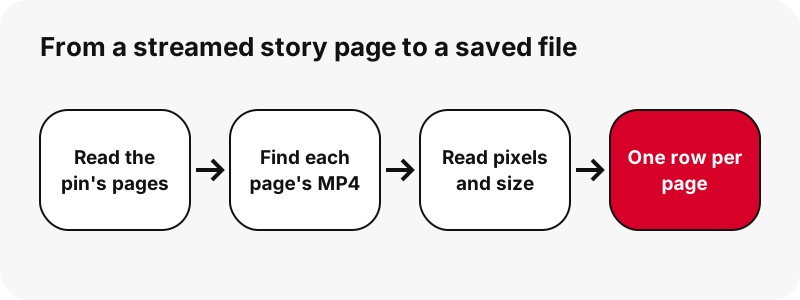
It reads the pin's public data, which lists the story's pages in order, and gives each page a row of its own on the result card. A moving page becomes a set of MP4 buttons plus stills; a still page becomes one button for the original image.
Pinterest's own help pages confirm that a single post can mix formats. Their article on creating pins says multi-page posts are a phone feature:
“To combine multiple images and videos in one video Pin, create a Pin with the Pinterest app.”
Because a Pinterest story saver lists pages separately, you can skip the intro page, keep the ingredient list as a picture and save only the clip that shows the tricky step. You never have to download a whole stitched video to get one moment out of it.
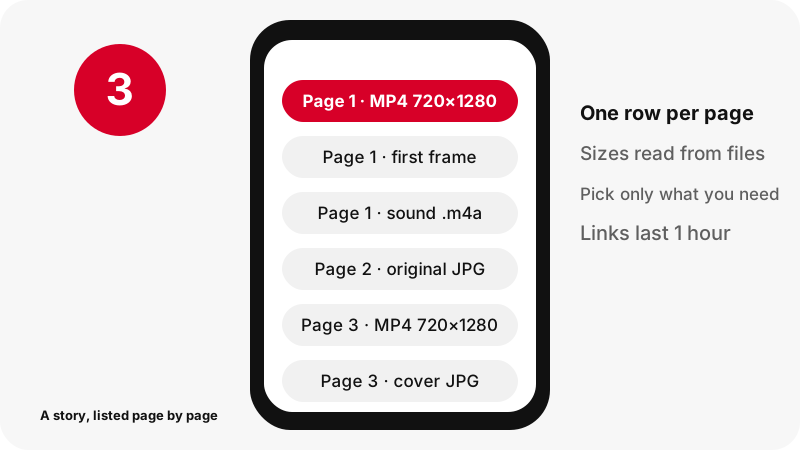
Honest note: most idea pins we met while testing on 2026-10-24 had a single page. The tool handles multi-page stories one page at a time, but we could not find a live story with several video pages to follow from start to finish, so we do not claim more than that.
Which files can you save from each page of a story?
Every page offers the files that really exist for it, and nothing else. The table shows what a moving page and a still page usually give you, with the sizes we measured.
| Page type | Buttons on the card | Measured example | Format |
|---|---|---|---|
| Moving page (video) | Main MP4 | 720×1280 | MP4 · H.264 video, AAC sound |
| Moving page (video) | Two lighter MP4s | about 486×864 and 360×640 | MP4 · same codecs |
| Moving page (video) | First frame of the clip | full size, e.g. 1080×1920 | JPG |
| Moving page (video) | Cover chosen by the creator | as uploaded | JPG |
| Moving page with music | Sound only | 80 KB for a 9.5 s page | M4A (AAC), cut on your device |
| Still page (picture) | Original image | the upload, not the 736 px preview | JPG, PNG or WebP as uploaded |
What about text, stickers and captions on a page?
Words typed onto a page and stickers are drawn into the picture, so they come with the MP4 or the image exactly as you saw them. There is no separate caption or subtitle file to download, and no way to remove text the creator placed on the page.
Why is the sound an M4A file?
The soundtrack inside the MP4 is AAC. Your browser copies it out as is, without converting it, and saves it as .m4a. It is not an MP3, and nothing is uploaded to us during that step. The Pinterest to MP3 page has the details.
How large is a saved Pinterest story?
Small: a short story page is a couple of megabytes, and even a ninety-second page stayed near 21 MB at the top size in our tests. Length and motion drive the weight far more than the resolution, which tops out at 720×1280 for these pins.
| What we saved (2026-10-24) | Largest MP4 | Other files |
|---|---|---|
| Single-page idea pin, 9.5 s | 720×1280 · 2.2 MB (2,244,061 bytes) | 486×864 · 1.3 MB · 360×640 · 0.9 MB · M4A 80 KB |
| Single-page idea pin, 90 s, source listed as 1080×1920 | 720×1280 · 20.9 MB | M4A about 738 KB · first frame 1080×1920 |
| Classic video pin, 13 s (not a story, for scale) | 576×1024 · 3.3 MB | M4A 109 KB |
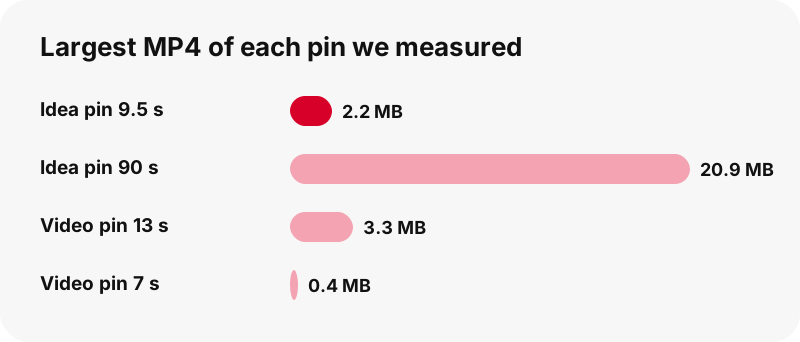
A useful rule of thumb from these numbers: roughly a quarter of a megabyte per second of story at 720p. A phone with a few gigabytes free can hold a large collection of saved stories, and the lighter copies are there when a message app or a slow connection gets in the way.
Why is 720p the top size for a saved idea pin?
Because that is the largest copy Pinterest keeps. A story uploaded at 1080×1920 was stored with 720×1280 as its biggest stream entry and biggest MP4 in our tests; no larger file existed to fetch. A saver cannot hand you pixels the server does not have.
Idea pins are delivered to the Pinterest player as a stream (HLS), cut into short chunks at several quality levels. The pin data often names only that stream, so SaverPin works out where the matching MP4 lives, asks for its first bytes and reads the true width, height and length before showing the button.
Labels such as 1080p or 4K for Pinterest stories are enlarged 720p files at best. SaverPin prints the measured size instead. Pinterest also keeps HEVC copies of some clips; we skip them because many browsers and older devices cannot play them. More on this in Pinterest video quality explained.
Is saving a story better than a screenshot or a screen recording?
Yes, in almost every case, which is the whole point of a Pinterest story saver. A screenshot of a still page captures your screen's resolution plus the app's buttons, and a screen recording squeezes a moving page through a second round of compression. The saved file is the one Pinterest serves, untouched.
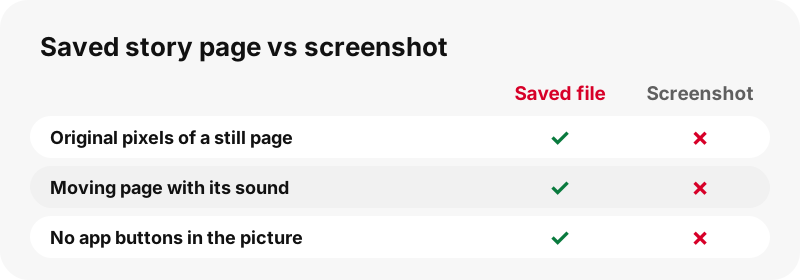
- Still pages: the original upload is often larger than the 736-pixel preview the feed shows. The image downloader page shows a measured example.
- Moving pages: the MP4 keeps the creator's sound, while many phones record the screen silently unless you change a setting.
- Cover image: you get the creator's chosen cover as a clean JPG, something a screenshot cannot reproduce once the clip starts playing.
Pinterest describes the cover as part of how these pins work: "Video Pins automatically play when they appear in your home feed and they have cover images to capture attention," says its guide to pin types. The thumbnail downloader saves just those covers.
Which story links can the saver read?
Any public pin link works: a pinterest.com address with /pin/ and a number, the same address on a country domain, or a pin.it short link from the share menu. If a pin.it link turns out to point at a board, the tool switches to board mode on its own.
| Link you paste | Accepted? | What happens |
|---|---|---|
| pinterest.com/pin/1234567890/ | Yes | The story is read and its pages listed |
| pinterest.fr, pinterest.de and other country domains | Yes | Read the same way |
| pin.it/abc123 short link | Yes | Followed to the pin (or to a board) |
| A public board link | Yes | Up to 50 pins listed, each one opened on demand |
| A profile page or a board section | No | A message asks for a single pin link |
| A pin on a secret board or private profile | No | Not readable: the tool never logs in |
The link downloader page explains every accepted address in more depth, including what to do with a link copied from a desktop browser.
Why won't some Pinterest stories save?
Almost always because the story is not public any more. SaverPin can only read what a logged-out visitor can open, so a story that needs an account, an invitation or a secret board stays closed to it.
- The creator deleted the story, or Pinterest removed it: there is nothing left to list.
- The link points to a profile or a board section rather than one pin.
- Pinterest did not answer in time: wait a moment and press Download again.
- Too many requests from one connection: the card asks you to pause for a minute.
- A button stopped working: it is older than one hour; paste the link again.
Pinterest's own page on private boards explains who can see them, and our private pins page explains why no honest tool can save them. For other errors, see download not working.
Where does a saved story page land on your phone or computer?
When you save Pinterest story pages, they go to your browser's Downloads location. From there you can move a page into Photos or your gallery; the exact path depends on the device.
On iPhone and iPad
Safari stores downloads in the Files app, in a Downloads folder, as Apple's support article describes. Open the file there and share it to Photos. Step-by-step help is in the iPhone guide for idea pins and the iPad guide.
On Android
Chrome saves to the phone's download location, and Google's help page points to the Files app to find it. The Android guide and the gallery guide cover the rest.
On a computer
Windows, macOS, Linux and ChromeOS all use the Downloads folder by default. Rename pages with their order number if you want to replay the story in sequence later. See the PC guide or where saved Pinterest files go.
What happens to the stories you save with SaverPin?
They go straight to you. Files stream from Pinterest's servers through a signed link that lives for one hour, and SaverPin keeps no copy. The sound is cut from the MP4 inside your browser, so it never passes through our server.
No account, no Pinterest login, no watermark and no install are involved. What the server does log, such as the pin address you send, is set out on the privacy page.
May you repost a Pinterest story you saved?
Not without permission. A saved story is fine as a personal reference; uploading it to your own account as if it were yours can infringe the creator's copyright. Pinterest's copyright policy lets owners have copies taken down.
If you want to share someone's story, ask them first, credit them by name and link to the original pin. Our page is it legal to download Pinterest videos covers personal use and fair use in plain words.
Which other tools help with Pinterest stories?
Multi-slide pins that are not stories have their own page: the Pinterest carousel saver. For a whole public board, use the board downloader. All tools share the same box and measured buttons.
Frequently asked questions
Is SaverPin a Pinterest story saver?
Yes. Paste the link of a public idea pin (what many people call a Pinterest story), press Download, and every page is listed with its own buttons and measured sizes.
Are Pinterest stories and idea pins the same thing?
In practice, yes. Story is the everyday word borrowed from other apps; Pinterest calls the format idea pins and files them under video Pins in its help center.
Can I save just one page of a story?
Yes. Each page has its own row, so you can save page three and ignore the rest.
Does the saved story keep the music?
Yes, if the page has a soundtrack. It is AAC sound inside the MP4. If a page is silent, the card says there is no sound to save.
What is the best quality for a saved Pinterest story?
720×1280 for moving pages, the largest copy Pinterest keeps even for 1080×1920 uploads. Still pages come as the original upload, in the format the creator used.
Can I get a story as one combined video?
No. Pages are saved one by one. Joining them would mean re-encoding, which lowers quality, so SaverPin gives you each page as Pinterest stores it.
Do text overlays come off when I save a story?
No. Text and stickers are part of the picture, so they stay on the saved file. There is no separate caption file.
Is there a Pinterest story saver for idea pins with many videos?
The tool lists such pins page by page. Most stories today are single-page, and we have not been able to test a live multi-video one end to end, so we say so plainly.
Do I need a Pinterest account?
No. SaverPin never asks you to log in and only reads public pins.
Does the creator know I saved their story?
SaverPin sends nothing to the creator and adds no notification. It only reads the public pin data that any visitor can load.
Can I save a story from a private account or a secret board?
No. If a story only opens when you are logged in, the saver cannot read it.
Why did my story button stop working?
Download links last one hour. Paste the story link again to get new ones.
Can I save the sound of a story as MP3?
The sound is saved as M4A, copied from the MP4 without conversion. Most phones, computers and music apps play M4A.
Does it work on iPhone, Android and desktop?
Yes. It runs in Safari, Chrome, Edge, Firefox and other modern browsers. There is no app to install.
Is SaverPin made by Pinterest?
No. SaverPin is an independent tool, not affiliated with Pinterest, Inc. It only reads pins that are already public.
Guides
Reels — Idea pins and multi-slide pins, one download per page.
Sources
- Types of Pins on Pinterest — Pinterest Help Center
- Create a Pin from an image or video — Pinterest Help Center
- Private boards — Pinterest Help Center
- Copyright — Pinterest Policy
- Stories (social media) — Wikipedia
- Pinterest — Wikipedia
- Find your downloads on iPhone or iPad — Apple Support
- Download a file (Chrome on Android) — Google Chrome Help