Where does the file go on Samsung Galaxy?
The default folder
Samsung says downloaded files are typically in the My Files app: open My Files and go to the Downloads folder.
Finding it right after the download
Open My Files › Downloads. If you used Chrome, More › Downloads in Chrome lists the file too.
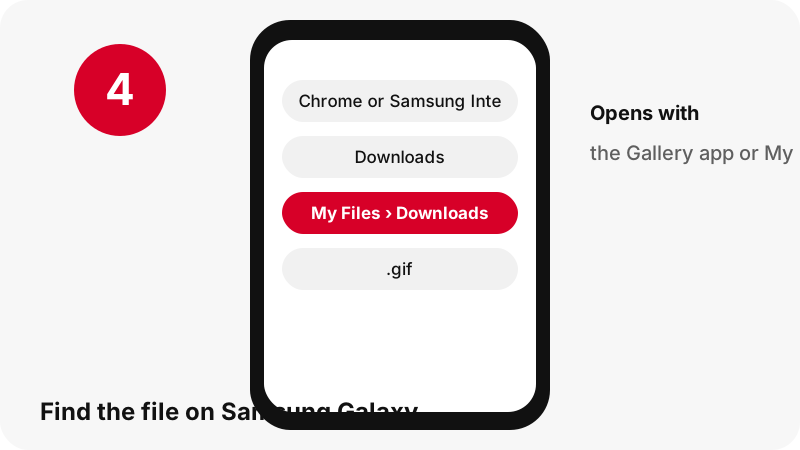
Samsung Galaxy at a glance
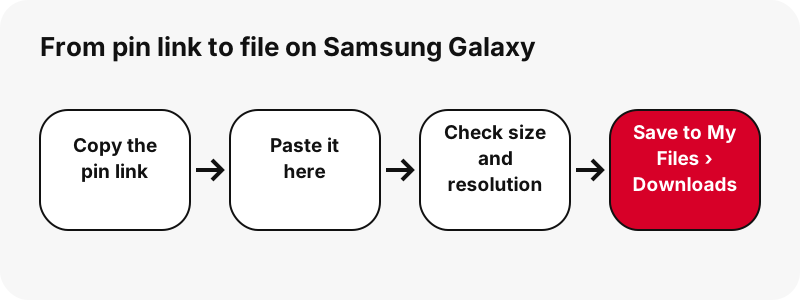
| Question | Answer on Samsung Galaxy |
|---|---|
| Browser | Chrome or Samsung Internet |
| Where the file lands | Samsung says downloaded files are typically in the My Files app: open My Files and go to the Downloads folder. |
| How to see it | Open My Files › Downloads. If you used Chrome, More › Downloads in Chrome lists the file too. |
| Opens with | The Gallery app or My Files |
| Change the folder | Downloads land in the Downloads category of My Files; files saved inside streaming apps do not appear there. |
What you get: the original animated .gif
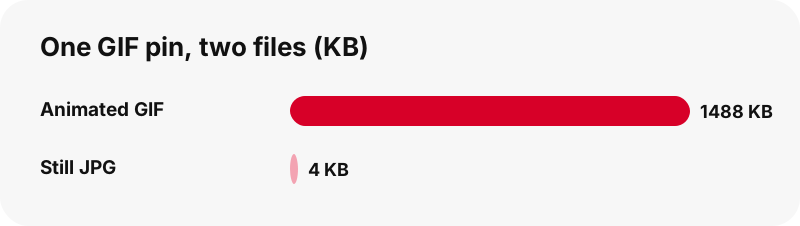
GIF pins keep the original animated .gif. We checked: Pinterest serves no MP4 copy of a GIF pin, so the download is the .gif itself, which can be large (a 128×128 animation in our test was 1.49 MB). A still JPG of the first frame is offered too.
| Detail | GIFs from Pinterest |
|---|---|
| File extension | .gif |
| Format | the original animated .gif |
| Largest version | the GIF exactly as uploaded; Pinterest stores no MP4 version of GIF pins |
| Opens on Samsung Galaxy with | The Gallery app or My Files |
| Preset on this page | GIF |
Which app opens it on Samsung Galaxy?
The Gallery app or My Files.
Keep it with your photos and media
My Files lets you view images, videos and audio and move them between storage locations; the Gallery app is Samsung's viewer for pictures and videos.
Good to know on Samsung Galaxy
Samsung's pages describe My Files and Gallery; they do not name the folder Samsung Internet uses, so check My Files › Downloads first.
If the download does not show up on Samsung Galaxy
- Check My Files › Downloads first: Open My Files › Downloads. If you used Chrome, More › Downloads in Chrome lists the file too.
- Make sure the pin is public. Private pins and secret boards cannot be read without logging in, and this tool never asks for your Pinterest password.
- Links expire after one hour. If a button stops working, paste the pin link again.
- A pin.it short link must be complete: copy it again from Share › Copy link.
Same GIFs on other devices
- Save Pinterest GIFs on iPhone
- Save Pinterest GIFs on Android
- Save Pinterest GIFs on PC
- Save Pinterest GIFs on Mac
- Save Pinterest GIFs on iPad
- Save Pinterest GIFs on Chromebook
- Save Pinterest GIFs on Windows
- Save Pinterest GIFs on Xiaomi
- Save Pinterest GIFs on Linux
- Save Pinterest GIFs in Safari
- Save Pinterest GIFs in Chrome
Save other pins on Samsung Galaxy
Frequently asked questions
Where do downloaded Pinterest GIFs go on Samsung Galaxy?
Samsung says downloaded files are typically in the My Files app: open My Files and go to the Downloads folder.
How do I find a downloaded Pinterest file on Samsung Galaxy?
Open My Files › Downloads. If you used Chrome, More › Downloads in Chrome lists the file too.
Which app opens the original animated .gif on Samsung Galaxy?
The Gallery app or My Files.
Can I choose another download folder on Samsung Galaxy?
Downloads land in the Downloads category of My Files; files saved inside streaming apps do not appear there.
What is the best quality I can get?
The GIF exactly as uploaded; Pinterest stores no MP4 version of GIF pins. The tool never upscales or renames a smaller file as HD.
Do I need an app or a Pinterest account?
No. It runs in the browser (Chrome or Samsung Internet), with no sign-up and no app to install.
Is SaverPin part of Pinterest?
No. SaverPin is an independent tool and is not affiliated with Pinterest. It only reads public pins.
Can I download private pins?
No. Only public pins can be read without logging in; private pins and secret boards are out of reach by design.
Can I get the GIF as an MP4?
Not from Pinterest: we checked, and it stores no MP4 copy of GIF pins. You get the original .gif plus a still JPG of the first frame.
Why is the GIF file so large?
Animated GIFs store every frame as a picture. In our test a 128×128 pixel animation was 1.49 MB, while the still JPG of the same pin was about 4 KB.
Guides
GIF — Keep the animated GIF exactly as it was uploaded.
Sources
- Where to find downloaded files on a Samsung phone — Samsung
- How to use My Files — Samsung
- Samsung Gallery app — Samsung
- Download a file (Chrome for Android) — Google
- Image file type and format guide (MDN) — MDN